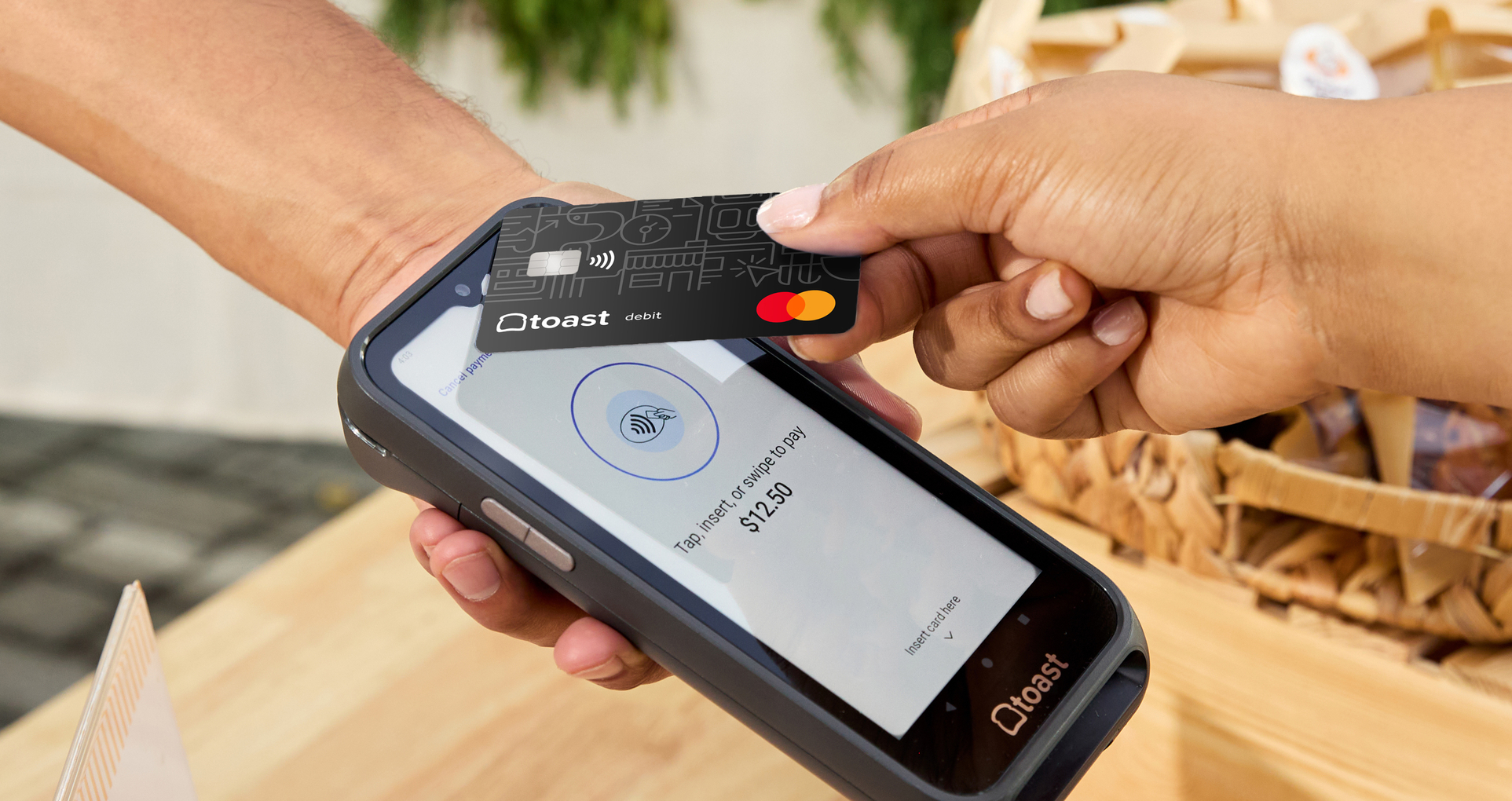
What Is a Contactless Payment? A Simple Guide for Restaurants
Contactless payments let customers tap a card, phone, or wearable to pay in seconds. Here's how the technology works, why it's faster, and what restaurant operators need to accept it.
Author
 RESOURCE
 Restaurant Equipment Checklist
Opening or upgrading a restaurant? Don't miss any essential equipment! Download our free, comprehensive restaurant equipment checklist.
Get Free DownloadContactless payments give restaurant guests faster, more flexible ways to order and pay without swiping, inserting, or handing over a physical card. From tap-to-pay cards to mobile wallets, these options help make checkout feel easier for both guests and staff.
For example, Toast Mobile Order & Pay allows guests to browse the menu, order, pay, and tip directly from their phones. That kind of contactless experience can help restaurants reduce lines and support leaner service models.
They’re also becoming a clear guest preference. According to a 2024 American Express report:
“The National Restaurant Association also found that 62% of full-service U.S. restaurant diners would choose contactless or mobile payment options if available. In other words, even in sit-down restaurants where hospitality and human interaction still matter, many guests want a faster digital payment process.”
In this guide, you’ll learn what contactless payments are, how they work, why they matter for restaurants, and how to accept contactless payment options.
Key takeaways
Contactless payments let guests pay by tapping, scanning, or using digital payment methods instead of swiping, inserting, or handing over a card.
Common contactless payment types include tap-to-pay cards, mobile wallets, QR code payments, tableside payments, kiosks, and online ordering.
Contactless payments can help restaurants speed up checkout, reduce lines, improve table turns, and create a smoother guest experience.
Security features like tokenization, encryption, dynamic transaction data, and biometric authentication help protect contactless transactions.
Restaurants can accept contactless payments by using compatible POS systems, NFC-enabled terminals, QR code tools, handheld devices, and clear staff workflows.
The New Steps of Service ROI Calculator
Use this calculator to learn how the New Steps of Service can benefit your restaurant and impact your bottom line.

What is a contactless payment?
A contactless payment is a transaction that lets customers pay without presenting a physical card. Instead, they can tap, scan, or pay digitally using options like tap-to-pay cards, smartphones, smartwatches, QR codes, mobile wallets, or other digital payment methods.
For restaurants, cafés, bars, food trucks, and retail counters, contactless payments can help reduce checkout friction and give guests faster, more flexible ways to pay.
Types of contactless payments
Contactless credit and debit cards: Customers can tap a card near a compatible payment reader instead of swiping or inserting it, making checkout faster at counters, cafés, food trucks, and more.
Mobile wallets: Apple Pay and other mobile wallets allow guests to pay with a stored card on their smartphone, offering a fast checkout option for dine-in, takeout, delivery, and counter service.
Wearable payments: Smartwatches and other wearable devices can support tap-to-pay transactions, giving customers another hands-free payment option.
QR code payments: Allow guests to scan a QR code, browse the menu, order, pay, and tip from their own phone.
Tableside payments: Handheld devices like Toast Go let servers accept payments at the table, helping reduce end-of-meal wait times and unnecessary trips to a fixed terminal.
Self-service kiosk payments: Toast Kiosk allows guests to place and pay for orders on their own, which can help quick-service restaurants, cafés, and fast-casual concepts keep lines moving.
Online ordering and mobile order-ahead payments: Toast Online Ordering lets guests place and pay for orders digitally before pickup or delivery.
Tap to Pay on compatible devices: Some businesses can accept contactless payments directly on supported smartphones or devices without relying on a traditional card reader.
Why should your restaurant accept contactless payments?
Contactless payments give guests more control over how they pay while helping staff spend less time managing payment friction. They’re also becoming increasingly common. According to a 2025 CNBC poll, more than half of Americans now use some form of contactless payment.
Faster checkout: Contactless payments help lines move faster during peak periods.
Shorter lines: Tap-to-pay and mobile wallet options are especially useful for QSRs, cafés, bakeries, food trucks, and retail counters.
Faster table turns: Guests can pay at the table or through QR codes without waiting for the check.
Better guest convenience: Customers can pay using the method they already prefer, from mobile wallets to tap-to-pay cards.
Less end-of-meal friction: Contactless options reduce the back-and-forth between server, guest, and terminal.
More efficient staff workflows: Staff spend less time handling cards, running payments, or waiting on fixed terminals.
Reduced cash handling: Restaurants can spend less time counting cash, making change, and reconciling drawers.
More accurate payment and guest reporting: Connected systems make tracking, reconciliation, and sales reporting easier; tools like Toast Loyalty can help capture guest data at checkout and encourage repeat visits.
Flexibility across service models: Contactless payments support dine-in, counter service, takeout, delivery, food trucks, and hybrid retail models.
Support for modern expectations: Many guests already expect tap-to-pay, mobile wallets, QR codes, and other fast digital payment options.
How do contactless payments work?
Contactless payments work by securely passing payment information from a customer’s card, phone, wearable, or QR code to the payment reader or processor.
For tap-to-pay cards and mobile wallets, this usually happens through near-field communication (NFC), which allows devices to exchange payment data when they’re held close together.
QR code payments work a little differently, but the technology serves a similar purpose. They let guests pay from their own device without handing over a card or waiting for a traditional checkout flow.
The guest chooses a contactless payment method: They tap a card, phone, or wearable, or scan a QR code to begin payment.
The payment information is securely transmitted: NFC-enabled payments send encrypted data to the reader, while QR code payments route guests through a digital checkout flow.
The payment processor verifies the transaction: The transaction is checked and authorized through the payment network.
Security tools protect the payment data: Tokenization, encryption, and dynamic transaction data help prevent sensitive card details from being exposed.
The payment is approved or declined: Once processed, the guest receives confirmation and the restaurant can complete the sale.
The transaction syncs with the POS: Approved payment data connects back to the POS for sales tracking, reporting, reconciliation, and operations.
Are contactless payments secure?
Contactless payments are generally considered secure because they use protections like tokenization, encryption, and dynamic transaction data. These safeguards help prevent sensitive card details from being exposed during payment.
In many cases, contactless payments can be more secure than older magnetic stripe payments because the payment data is not static or easy to reuse.
Tokenization: Sensitive card information is replaced with a unique digital token during the transaction.
Encryption: Payment data is protected while it moves between the payment method, reader, and processor.
Dynamic transaction data: Each transaction uses unique data, making captured information harder to reuse.
Short NFC range: Contactless card and wallet payments only work when the payment method is very close to the reader.
Biometric authentication: Mobile wallets often require Face ID, fingerprint, passcode, or device authentication.
Reduced card handling: Guests do not need to hand over their card, which can reduce exposure during checkout.
How to accept contactless payments at your restaurant
To accept contactless payments, your restaurant needs payment hardware, software, and workflows that support fast digital transactions. The right setup depends on your service model, whether you run a full-service restaurant, QSR, café, bar, food truck, or hybrid retail operation.
Choose a POS that supports contactless payments: A POS like Toast can help restaurants accept contactless payments while keeping orders, payments, and reporting connected.
Use NFC-enabled payment terminals: Compatible card readers allow guests to tap contactless credit cards, debit cards, phones, or wearables.
Enable mobile wallets: Make sure guests can pay with options like Apple Pay and other digital wallets.
Offer QR code ordering and payment: QR code tools can let guests order, pay, and tip from their own phones where it fits your service model.
Consider handhelds, kiosks, or mobile payment devices: Tableside handhelds, self-service kiosks, and mobile readers can help support different restaurant formats.
Train staff on accepted payment options: Employees should know how each payment type works and how to help guests use them.
Display accepted payment types clearly: Signage at the counter, table, kiosk, or checkout page can reduce confusion.
Keep payment data connected with POS reporting: Integrated systems help track sales, tips, tenders, taxes, and reconciliation more accurately.
Review processing and guest experience regularly: Monitor transaction speed, payment errors, reconciliation issues, and guest feedback to keep checkout smooth.
No contact, no problem
Contactless payments are an important part of how guests expect modern checkouts to work. By offering more flexible ways to pay, your restaurant can reduce friction at the table and across digital ordering channels.
The best setup depends on how your guests order and how your team runs service. Whether contactless payment happens through tap-to-pay or online ordering, the goal is to make checkout feel simple, secure, and seamless.
Restaurant Operations Manual Template
Use this free template to easily outline all of your operating procedures and make day-to-day operations as consistent as possible.
FAQs
What is a contactless payment?
A contactless payment is a transaction that lets customers pay without swiping, inserting, or handing over a physical card. Common examples include tap-to-pay cards, mobile wallets, QR code payments, wearable payments, and online payments.
Is tap-to-pay safe?
Yes, tap-to-pay is generally considered safe because it uses security features like encryption, tokenization, and dynamic transaction data. These protections help keep sensitive card details from being exposed during checkout.
Do contactless payments require a PIN?
Contactless payments do not always require a PIN, especially for smaller transactions. However, some payments may require additional verification depending on the card issuer, transaction amount, device, or payment method.
What devices can make contactless payments?
Customers can make contactless payments with tap-to-pay credit or debit cards, smartphones, smartwatches, and other wearable devices. QR code payments also allow guests to pay from their own mobile devices.
How do restaurants accept contactless payments?
Restaurants can accept contactless payments by using a POS system and payment hardware that support NFC payments, mobile wallets, QR code payments, handheld devices, kiosks, or online ordering.
What’s the difference between NFC and QR code payments?
NFC payments use short-range wireless technology to transmit payment data when a card, phone, or wearable is held near a payment reader. QR code payments let guests scan a code and complete checkout through a digital payment flow on their own device.
Can contactless payments be used for tableside payments?
Yes, contactless payments can be used for tableside checkout through handheld payment devices, QR codes, or mobile wallets. This can help reduce end-of-meal wait times and make payment easier for both guests and staff.
Training Manual Template
Use this restaurant training manual template, a customizable Word Doc, to provide your staff with the rules, guidelines, and clarity they need to do their jobs efficiently.


Is this article helpful?
DISCLAIMER: This information is provided for general informational purposes only, and publication does not constitute an endorsement. Toast does not warrant the accuracy or completeness of any information, text, graphics, links, or other items contained within this content. Toast does not guarantee you will achieve any specific results if you follow any advice herein. It may be advisable for you to consult with a professional such as a lawyer, accountant, or business advisor for advice specific to your situation.
 Trending


Subscribe to On the line
Sign up to get industry intel, advice, tools, and honest takes from real people tackling their restaurants' greatest challenges.
By submitting, you agree to receive marketing emails from Toast. We’ll handle your info according to our privacy statement. Additional information for California residents available here.