Best POS Systems for Sushi Restaurants (2026 Guide)
Running a sushi restaurant means managing precision at every station. Here's what to look for in a POS system, and why the right one protects your margins and your craft.

Author
 RESOURCE
 Restaurant Equipment Checklist
Opening or upgrading a restaurant? Don't miss any essential equipment! Download our free, comprehensive restaurant equipment checklist.
Get Free DownloadGreat playlist for your sushi restaurant: “Music for a Sushi Restaurant” by Harry Styles.
Great POS for a sushi restaurant: That's what this guide is for.
One wrong modifier or one missed ticket can mean one expensive piece of toro in the trash. Sushi is a game of precision, and the POS system behind your counter either keeps up or costs you. Here's what to look for.
Running a sushi restaurant isn't like running most other concepts. You're managing two kitchens at once, tracking perishable fish that cost more per ounce than almost anything else on a restaurant menu, and trying to turn tables fast enough to make the numbers work, all while delivering an experience that keeps guests coming back. The technology behind your counter should make that easier.
This guide breaks down what separates a sushi-ready POS from a generic one, which features matter most for your format, and how to evaluate your options in 2026.
What makes sushi restaurants different from other concepts
Sushi restaurants operate differently than a standard full-service or fast-casual concept, and those differences have direct implications for your POS needs.
A few of the most common operational challenges:
Split kitchen routing: Most sushi restaurants run a sushi bar and a hot kitchen simultaneously. When a ticket fires to the wrong station, it doesn't just slow things down — it creates errors on high-cost items that can't be recovered.
Modifiers: Sushi orders often require precise modifications, from adding or removing ingredients to swapping fish or accommodating allergies. Restaurants need a POS that can clearly communicate those changes to the kitchen while accurately reflecting any associated price adjustments.
Piece-count and portion tracking: Unlike entrée-based menus, sushi is ordered by the piece, roll, or set. Item-level accuracy matters for both check integrity and food cost.
Daily specials and seasonal fish: Your menu changes based on what's fresh. If updating a special or 86ing an item requires a call to tech support, that's a problem at 5:45 PM on a Friday.
Omakase and tasting menu formats: Chef's choice formats require flexible course management and the ability to pace a meal — not just ring up items in sequence.
High-volume service windows: Compressed dinner rushes leave no room for friction. Every second a server spends waiting on a slow system is a second they're not on the floor.
Guest relationships and repeat business: In competitive urban markets, the difference between a one-time visit and a weekly reservation often comes down to whether guests feel remembered. A POS with integrated loyalty tools helps you turn a first-time takeout order into a regular.
Restaurant Business Plan Template
No matter where you’re at in your restaurant ownership journey, a business plan will be your north star. Organize your vision and ensure that nothing is overlooked with this free template.

Key features to look for in a sushi restaurant POS
Not every POS system is built for the nuances of Japanese cuisine service. When evaluating options, prioritize these capabilities:
Menu management flexibility You should be able to add, remove, or modify menu items in seconds — especially for daily fish specials or market-price items. If updating a menu requires downtime or a back-office login that only the manager knows, it will become a bottleneck during service.
Multi-station kitchen display routing The ability to route specific items to specific kitchen display screens is non-negotiable for sushi operations. Nigiri and sashimi should fire to the sushi bar; hot apps and ramen should go to the hot line. No manual relay means no miscommunication — and no wasted fish.
Table and course management For full-service sushi restaurants, table management tools that support course pacing — holding a fire until the previous course is cleared — improve both the guest experience and kitchen coordination.
Inventory and waste tracking Seafood is expensive and perishable. A POS with integrated inventory tracking helps you monitor ingredient-level usage, flag low-stock items, and protect your margins on high-cost proteins like bluefin tuna or uni. Know your costs without digging through a single spreadsheet.
Online ordering and delivery integration Online ordering has become a baseline expectation for most restaurant concepts. For sushi restaurants, integrating delivery and pickup orders directly into the POS — rather than managing a separate tablet — reduces errors and keeps the kitchen informed in real time.
Reporting and analytics Stop guessing on which rolls are driving revenue and which are sitting. Strong reporting tools surface item-level performance, waste patterns, and margin data so you can make smarter menu and purchasing decisions — without manually compiling a single report.
Loyalty and guest retention Repeat business is the growth lever most sushi operators underestimate. A POS with native loyalty tools lets you build stronger customer relationships and drive more purchases — turning occasional guests into regulars.
Opening a Restaurant Checklist
So many things go into opening a restaurant. Use this free PDF checklist to set your new restaurant up for success.
Top POS systems for sushi restaurants in 2026
POS System | Course Timing | Perishable Inventory Tracking | Multi-Station Kitchen Routing | Multilingual Support | Multilingual Hardware Interfaces | Offline Mode |
Yes | Yes — available through xtraCHEF | Yes | Yes | Yes — POS, handhelds, KDS | Yes — continue taking orders and queue payment processing during internet disruptions | |
Square | Yes | Yes — available through Square Restaurant Inventory by MarketMan | Yes | Limited | Limited — select devices/features | Yes — supported devices can accept offline payments for processing after reconnecting |
Clover | Not clearly documented | Limited / third-party apps available | Limited / app-dependent | Limited | Limited — select experiences | Yes — supported U.S. devices can accept offline payments for processing after reconnecting |
Lightspeed | Yes/Limited depending on product and configuration | Yes — available through Inventory add-on | Yes/Limited depending on product and configuration | Limited | Not clearly documented; contact Lightspeed directly | Limited — functionality varies when internet connectivity is unavailable |
TouchBistro | Yes | Limited | Yes | Limited | Limited — KDS supports English and Spanish | Yes — core ordering and supported payment workflows can continue offline |
Lavu | Yes | Limited | Yes | Limited | Not clearly documented; contact Lavu directly | Yes — orders and kitchen tickets can continue offline; offline card processing requires supported Store & Forward setup |
MenuSifu | Yes/Limited | Limited | Yes | Yes | Yes — POS, KDS, and self-ordering screens | Offline functionality available; contact MenuSifu for current capabilities and limitations |
Chowbus | Limited | Limited | Yes | Yes | Not clearly documented; contact Chowbus directly | Limited — POS ordering and payments can continue offline; device syncing, tablet ordering, QR ordering, and kiosks are unavailable |
Competitive information and data on this page were compiled as of August 2026 based on publicly available information and may be incomplete, inaccurate, or subject to change without notice. For the most current information about a competitor’s products, features, and capabilities, please contact that provider directly. Toast does not make any representations as to the completeness or accuracy of this information.
Why Toast works for sushi restaurants
Toast is built for the busiest of businesses, which means every feature is designed around the realities of foodservice, not adapted from a retail or general-purpose platform. For sushi operators specifically, that distinction matters.
Here's what that looks like in practice:
Multilingual Hardware Interfaces
Toast carries translation all the way through, from the back-of-house order flow (Toast Go, KDS, POS terminals) to the backend workflows customers already rely on (Toast Web, Toast IQ, Toast Now), paired with the workflow capabilities that already support how complex, high-volume kitchens run.
Get every ticket to the right station Toast's Kitchen Display System with multi-station routing sends sushi bar tickets to the sushi bar and hot kitchen tickets to the hot line. No confusion, no duplication, no expensive mistakes on high-cost proteins.
Fire orders tableside and eliminate the round trip Toast Go 3 handhelds let servers send orders directly to the correct station from anywhere on the floor. For a high-volume dinner service, that speed compounds across every table, every turn.
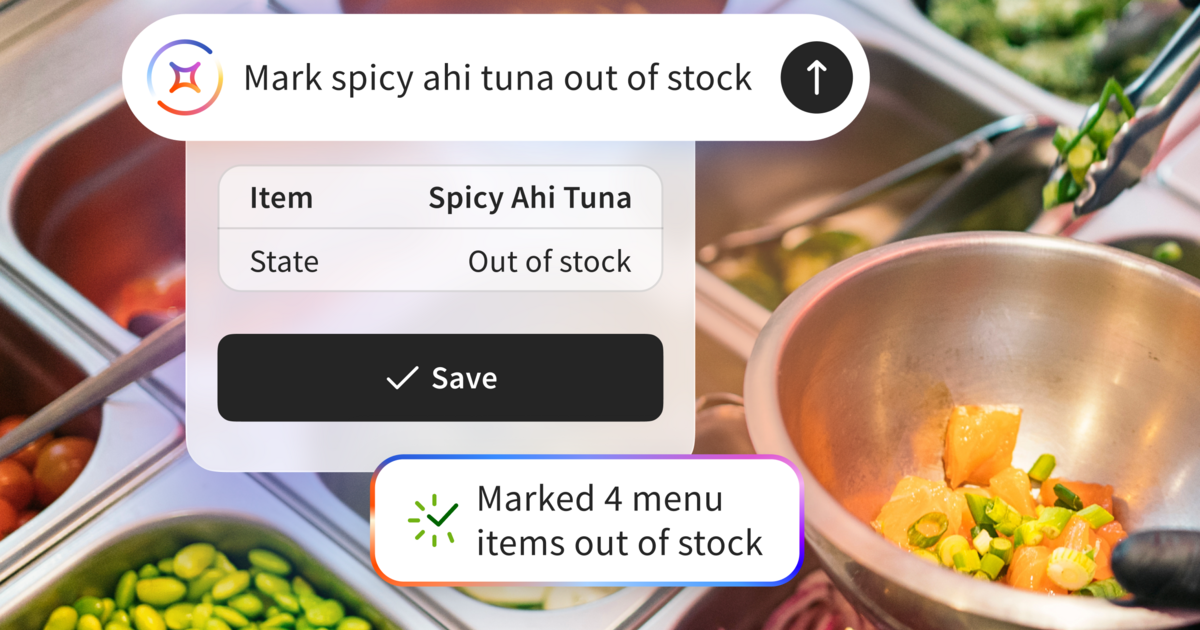
Update your menu in real time, from anywhere 86 a fish special mid-service, adjust a market price, or add a new roll without touching a back-office terminal. Toast Now management app is built for the pace of a working kitchen.
Protect your margins with ingredient-level tracking Toast Inventory helps you track real-time depletion so you can better monitor high-cost items like toro or uni, helping reduce over-ordering and unexpected spoilage.
Spot top-selling rolls and waste patterns without digging through reports. According to Toast’s 2026 Voice of the Restaurant Industry Survey, AI is now mainstream: 87% of operators feel comfortable using AI, and nearly 9 in 10 are experimenting with it.
Toast IQ uses AI-powered insights to surface what's working and what's not, which rolls are driving revenue, where costs are climbing, and where you're leaving money on the table. The data is there when you need it, without the manual work. In fact, 200,000+ restaurant operators across 140,000 locations have used Toast IQ.*
Bring online orders into the kitchen automatically. Toast Online Ordering connects directly to your kitchen display system, no third-party tablet, no manual re-entry, no missed modifiers on a spicy tuna roll.
Manage reservations and pacing for omakase and chef's counter formats. Toast Tables® supports reservation and waitlist management, with flexible check management tools that let you add courses mid-service and pace the meal on your terms, not the system's.
Turn first-time guests into regulars. Toast Loyalty is built into the platform, so you can build stronger customer relationships and drive more purchases without a separate program or third-party integration. It’s designed to help turn first-time takeout guests into regulars.
Stay online when the internet doesn't. Toast's Offline Mode allows terminals to continue taking orders and queuing payment processing even during internet disruptions, helping keep your service moving. A system that stays online when the internet doesn't — that's the kind of reliability a Friday dinner rush demands.
According to Toast’s 2026 Voice of the Restaurant Industry Survey, 20% of restaurant operators said that simplifying operations was their top business goal, up 1 point year-over-year. The right POS is where that efficiency starts.
Restaurant Operations Manual Template
Use this free template to easily outline all of your operating procedures and make day-to-day operations as consistent as possible.
How to evaluate POS pricing for your sushi restaurant
POS pricing varies significantly based on the size of your operation, the number of terminals, and which features you need. Most modern systems use a software-as-a-service (SaaS) model with monthly subscription fees layered on top of hardware costs and payment processing rates.
When comparing options, look beyond the base subscription price and account for:
Hardware costs (terminals, KDS screens, receipt printers, Toast Go 3 handhelds)
Payment processing rates (flat-rate vs. interchange-plus pricing)
Add-on module costs (online ordering, loyalty, payroll, inventory)
Contract terms and cancellation policies
Customer support availability — 24/7/365 support from people who know your business matters most when something goes wrong during dinner service
Toast's pricing page outlines current plan options, including a Starter Kit for smaller operations and more robust plans for full-service restaurants with multiple stations.
Questions to ask before signing a POS contract
Before committing to any system, ask vendors the following:
Can I route specific menu categories to different kitchen display screens?
How quickly can I update or 86 a menu item during service?
Does online ordering integrate directly into the POS, or does it require a separate device?
What does the onboarding and training process look like?
What happens if the system goes offline — does it continue processing orders and payments?
What are the total costs over a 12-month period, including hardware, software, and processing?
Is there 24/7 support available during service hours?
Offline mode deserves particular attention. A POS that goes down during a Friday dinner rush at a high-volume sushi restaurant is a serious operational risk — and "we'll have someone look at it Monday" isn't an acceptable answer.
Choosing the right POS system for your restaurant format
Not all sushi restaurants operate the same way, and the right POS depends on your specific format:
Fast-casual sushi and poke concepts need speed, simple menu management, and strong online ordering integration to handle high ticket volume without friction
Full-service sushi restaurants benefit most from table management, course pacing, and multi-station KDS routing — the tools that keep a complex service running cleanly
Omakase and chef's counter formats require flexible check management, the ability to add courses mid-service, and reservation tools like Toast Tables® to manage the guest experience from booking to close
High-volume conveyor or kaiten sushi operations need fast checkout capabilities and accurate item tracking across a high-turnover format
The playlist is optional. The POS isn't
Matching your POS to your service model, rather than choosing a generic system and working around its limitations, is one of the most impactful operational decisions a sushi restaurant owner can make. The right technology doesn't run your restaurant. You do. It just makes sure nothing gets in the way.
Stop working around your POS. Start working with one built for sushi. Get a demo of Toast today.
FAQ
What is the best POS system for a sushi restaurant? For full-service operations, look for systems with multi-station kitchen display routing, flexible menu management, and table management tools. Toast is built exclusively for restaurants and covers all of these needs within a single platform.
Do sushi restaurants need a special POS system? Not a sushi-specific system, but they do need a restaurant-grade POS with specific capabilities — particularly multi-station KDS routing, fast menu editing for daily specials, and ingredient-level inventory tracking for perishable seafood.
How much does a restaurant POS system cost? Costs vary widely. Most restaurant POS systems charge a monthly software fee ranging from $0 to $100+ per terminal, plus hardware costs and payment processing fees. Toast offers multiple pricing tiers depending on the size and complexity of the operation. See current options at pos.toasttab.com/pricing.
Can a POS system help reduce food waste at a sushi restaurant? Yes. POS systems with integrated inventory tracking allow operators to monitor ingredient-level usage in real time — which helps reduce over-ordering and spoilage on high-cost, perishable items like fresh fish. Toast IQ goes further, surfacing waste patterns and cost trends so you can act before the problem compounds.
What is a kitchen display system (KDS) and why does it matter for sushi restaurants? A KDS is a screen in the kitchen that displays incoming orders digitally, replacing paper tickets. For sushi restaurants with both a sushi bar and a hot kitchen, a KDS with multi-station routing ensures each station only sees the tickets relevant to them — reducing errors and improving speed of service. No manual relay means no miscommunication, and no wasted fish.
Does Toast work for omakase restaurants? Yes. Toast's table management, course pacing, and flexible check management tools make it a strong fit for omakase formats. Toast Tables® supports reservation management, which is essential for chef's counter and tasting menu concepts where every seat is intentional and every course needs to land on time.
*Figures reflect unique chat-functionality messages sent by restaurant operators within the Toast IQ platform. Data accurate through June 2026.
Is this article helpful?
DISCLAIMER: This information is provided for general informational purposes only, and publication does not constitute an endorsement. Toast does not warrant the accuracy or completeness of any information, text, graphics, links, or other items contained within this content. Toast does not guarantee you will achieve any specific results if you follow any advice herein. It may be advisable for you to consult with a professional such as a lawyer, accountant, or business advisor for advice specific to your situation.

Subscribe to On the line
Sign up to get industry intel, advice, tools, and honest takes from real people tackling their restaurants' greatest challenges.
By submitting, you agree to receive marketing emails from Toast. We’ll handle your info according to our privacy statement. Additional information for California residents available here.