
How to Choose Restaurant Employee Scheduling Software
Labor costs can add up fast without the right tools. Learn how to choose the best restaurant employee scheduling software for your team.
Autor
 Recurso
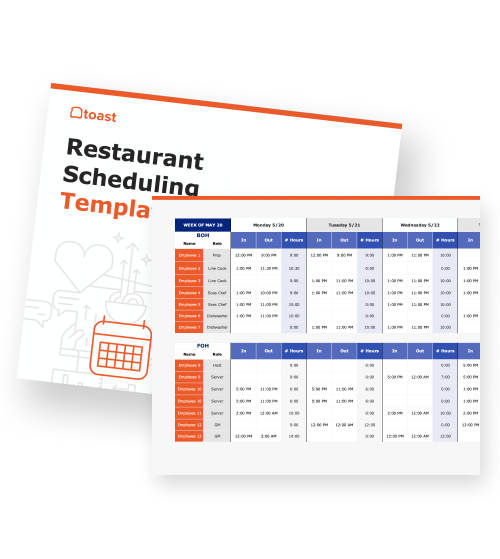
 Plantilla de programación de horarios para restaurantes
Usa la plantilla de programación para restaurantes a fin de programar fácilmente los turnos del personal de tu restaurante.
Obtener descarga gratisRestaurant employee scheduling software is a tool that helps restaurants create, manage, and optimize staff schedules more efficiently.
With labor often making up 30–35% of total revenue, having the right scheduling system in place is critical for controlling costs, improving operations, and keeping teams aligned. As Barry McGowan, CEO of Fogo de Chão, explains:
“In a perfect world everybody gets their schedule, all the guests show up at the right time… Unfortunately, business changes… sometimes scheduling and forecasting is somewhat unpredictable.”
Technology, McGowan notes, has become essential in helping operators better anticipate and plan for those shifts. In this guide, you’ll learn what restaurant employee scheduling software is, why it matters, and what features to look for when choosing the right platform for your business.
Key takeaways
Restaurant employee scheduling software centralizes scheduling, availability, and communication into one system.
Even small scheduling improvements can reduce labor costs and improve day-to-day operations.
Key features like overtime alerts, shift swapping, and mobile access help streamline scheduling and prevent errors.
Integration with POS and payroll systems reduces manual work and improves accuracy across your operation.
Choosing the right platform depends on your restaurant’s size, complexity, and existing tech stack.
Lista de verificación de la incorporación de nuevos empleados a un restaurante
Incorporar nuevos empleados a tu equipo puede ser emocionante y desafiante a la vez. Usa esta lista de comprobación en PDF gratuita para que tu personal tenga éxito.

What is restaurant employee scheduling software?
Restaurant employee scheduling software replaces manual scheduling methods—like spreadsheets or paper schedules—with a centralized system that keeps shifts, availability, and labor data organized in one place.
Automated scheduling: Build schedules faster using templates, sales data, or labor targets instead of starting from scratch each week.
Shift management: Assign, adjust, and track shifts in real time as conditions change.
Availability tracking: Let employees submit availability and time-off requests directly in the system.
Centralized system: Keep schedules, updates, and communication in one place instead of scattered across texts or emails.
Built for restaurant teams: Designed for managers, owners, and multi-location operators who need to coordinate staff across shifts and roles.
Why is scheduling software important for restaurants?
Scheduling software plays a key role in helping restaurants control costs and run more efficiently. Even small improvements in scheduling can have a major impact on profitability and day-to-day operations.
Reduces labor costs: Align staffing levels with demand to avoid unnecessary payroll expenses.
Prevents overstaffing and understaffing: Ensure you have the right number of employees scheduled for each shift.
Saves manager time: Automate repetitive scheduling tasks so managers can focus on operations and service.
Improves staff communication: Keep schedules, updates, and changes in one place instead of scattered messages.
Supports labor law compliance: Stay aligned with minimum wage laws and regulations, which vary widely by state.
Key features to look for in employee scheduling software
The right scheduling software should do more than just assign shifts—it should help you control labor costs, improve communication, and simplify day-to-day operations. Look for features that reduce manual work while giving you better visibility into your team.
Budget and overtime alerts: Get notified when schedules approach overtime thresholds or exceed labor targets so you can adjust before costs hit payroll.
Availability and time-off management: Let employees submit availability and requests directly in the platform to reduce conflicts and back-and-forth.
Shift swapping and coverage tools: Enable staff to swap shifts with manager approval, helping prevent no-shows and last-minute scheduling gaps.
Centralized team communication: Keep schedules, updates, and announcements in one place instead of scattered across texts and emails.
Time clock integration: Compare scheduled vs. actual hours in real time to catch overtime early and improve accuracy.
Mobile access: Ensure staff can view schedules, request changes, and stay updated from anywhere using a mobile-friendly platform.
POS and payroll integration: Sync scheduling with your POS and payroll systems to reduce manual entry and streamline operations. Tools like Toast Payroll & Team Management can process payroll in as little as 15 minutes, and under five minutes for smaller teams.*
*Based on Toast internal data. Results may vary.
What to consider when choosing a platform
Before selecting a scheduling tool, it’s important to choose a platform that fits how your restaurant operates. The right software should reduce complexity—not add to it.
Size and complexity of your operation: A single-location café has very different needs than a multi-unit group managing dozens of employees across locations.
Integration with existing systems: Look for tools that connect with your POS, payroll, and HR platforms to avoid manual data entry and disconnected workflows.
Ease of use for managers and staff: Adoption depends on how intuitive the platform is—if it’s hard to use, your team won’t use it.
Reporting and analytics: Make sure you can track labor costs, hours worked, and performance across shifts and locations.
Pricing model: Some platforms charge per employee per month, while others offer flat-rate pricing—choose what aligns with your budget and scale.
For example, platforms like Sling by Toast integrate directly with POS and payroll systems, allowing labor data to sync automatically across scheduling, time tracking, and payroll. This kind of integration helps reduce manual work, flag overtime before it happens, and keep operations aligned across locations—all within a system your team already uses.
Good schedules = good shifts
Restaurant employee scheduling software helps you move from reactive scheduling to a more organized, data-driven approach. As restaurant tech professional Hillary Holmes explains:
“When you have tools for labor management that give managers time back in their day and give team members great transparency, you’re setting yourself up for success.”
With an integrated POS system, scheduling becomes less of a weekly headache and more of a reliable process that supports your entire operation. The result is better labor control, smoother shifts, and a more consistent experience for both your staff and your guests.
Plantilla de manual de operaciones para restaurantes
Usa esta plantilla gratuita para describir fácilmente todos tus procedimientos operativos y lograr que las operaciones diarias sean tan uniformes como sea posible.
FAQ
What is restaurant employee scheduling software?
Restaurant employee scheduling software is a tool that helps restaurants create, manage, and optimize staff schedules while centralizing availability, shifts, and communication in one system.
How does scheduling software help control labor costs?
It aligns staffing with demand, flags overtime risks, and reduces overstaffing, helping you manage one of your largest expenses more effectively.
Does scheduling software help with compliance?
Yes, it helps track hours, overtime, and wage rules so you can stay compliant with labor laws and avoid costly violations.
Can scheduling software reduce employee turnover?
It can improve retention by giving employees more visibility, flexibility, and control over their schedules, which leads to better work-life balance.
How does scheduling software integrate with payroll?
It syncs employee hours directly with payroll systems, reducing manual data entry and ensuring accurate, timely payment processing.
What’s the difference between scheduling software and a time clock?
Scheduling software plans and manages shifts, while a time clock records when employees actually work—many platforms combine both for better accuracy and control.


¿Es útil este artículo?
AVISO LEGAL: Esta información se proporciona solo con fines informativos generales y su publicación no constituye un aval. Toast no garantiza la precisión ni la integridad de la información, el texto, los gráficos, los enlaces y otros elementos que incluye este contenido. Toast no garantiza que alcanzarás ningún resultado específico si sigues los consejos que aparecen aquí. Te recomendamos consultar con un profesional, como un abogado, contador o asesor comercial, para recibir asesoramiento específico para tu situación.
 Tendencias

Subscribe to On the line
Sign up to get industry intel, advice, tools, and honest takes from real people tackling their restaurants' greatest challenges.
Al enviar, aceptas recibir correos electrónicos de marketing de Toast. Trataremos tu información de acuerdo con nuestra declaración de privacidad. Información adicional disponible para residentes de California aquí.