
How to Choose and Customize a Restaurant Menu Template
Skip the blank page. Browse free, customizable restaurant menu templates and real examples you can adapt for your own concept in minutes.
Autor
 RECURSO
 Plantillas de menús de restaurante
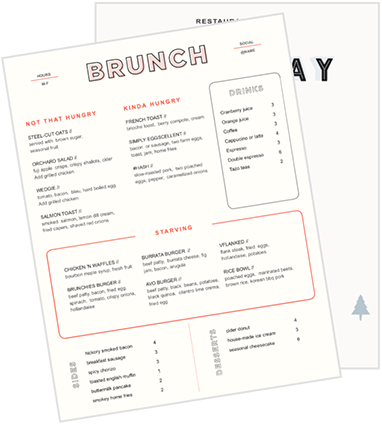
Usa estas plantillas de menús como punto de partida para el diseño de tu menú o para renovar tu menú actual.
Obtener descarga gratisA restaurant menu template is a customizable layout for organizing menu items, descriptions, prices, and branding. It gives operators a structured starting point while leaving room to reflect the restaurant's concept, service model, and guests.
Operators can download Toast’s complimentary restaurant menu templates and adapt the closest fit to their business. The editable PowerPoint files cover several restaurant concepts and can be customized for printing.
This guide explains what a restaurant menu template should include, how to choose the right one, and how to turn it into an accurate menu for print and digital channels.
Key takeaways
A restaurant menu template provides the layout, but the restaurant must supply accurate content, branding, and policies.
Choose a template based on the concept, service model, menu complexity, format, and ordering channels.
Audit item availability, costs, prices, popularity, and profitability before redesigning the menu.
Clear sections, concise descriptions, and consistent visual hierarchy help guests order more easily.
Proofread every version and keep printed and digital menus aligned as items, prices, and availability change.
 Start optimizing your menu
 Toast Menu Checker
Fresh ideas for your restaurant menu in 3 quick steps.

What is a restaurant menu template?
A restaurant menu template is an editable design framework that determines how menu information is organized and presented. The template supplies the layout and visual structure, while the restaurant adds its items, descriptions, prices, logo, and policies.
A useful template helps guests scan categories, understand dishes, compare choices, and decide what to order. Applying basic menu psychology can also help restaurants direct attention without making the layout difficult to navigate.
Remember, though, a template is not a substitute for accurate menu information. Its value comes from making the restaurant's content easier for guests to understand.
Free restaurant menu templates by concept
The best restaurant menu template reflects how the restaurant serves food and how its guests make decisions. A tasting menu, pizza menu, catering package, and children's menu each require a different structure.
Fine-dining menu templates: Best for tasting menus, prix fixe service, and upscale à la carte dining that requires clear course progression.
Pizzeria menu templates: Best for dine-in pizzerias, delivery concepts, and slice shops that need to organize sizes, crusts, toppings, combinations, and add-ons.
Bar menu templates: Best for bars, lounges, pubs, and beverage-led restaurants that organize drinks by category, ingredients, size, and price.
Catering menu templates: Best for menus that need to explain portions, minimums, packages, add-ons, and ordering requirements.
Kids' menu templates: Best for family restaurants that need simple choices, readable labels, useful imagery, and parent-friendly information.
A restaurant doesn't have to fit neatly into one category. A brewery serving a full food menu, for example, might combine the organization of a restaurant template with the beverage structure of a bar template. The same layouts can also be adapted for breakfast, bakery, coffee shop, food truck, dessert, and wine menus.
Hoja de cálculo de ingeniería de menús
Usa esta hoja de cálculo de ingeniería de menús, que contiene fórmulas de ingeniería de menús de alta complejidad, para determinar los puntos fuertes y débiles de tu menú.
What should a restaurant menu template include?
A useful menu template provides enough information to help guests order without crowding the page. Not every restaurant needs every element, so operators should include what supports the ordering experience or fulfills a specific requirement.
Restaurant identity: Include the restaurant's name, logo, colors, and relevant contact information.
Menu sections: Divide offerings into recognizable categories such as appetizers, entrées, sides, desserts, and beverages.
Item names: Use names that guests can identify and scan quickly.
Descriptions: Explain important ingredients, preparation methods, and defining qualities.
Prices: Show base prices and charges for additions, substitutions, or upgrades clearly.
Modifiers: Identify available sizes, sides, toppings, flavors, and other choices.
Dietary labels: Apply symbols for vegetarian, vegan, gluten-free, or other relevant categories consistently.
Allergen guidance: Direct guests to employees or the restaurant's established food-allergy procedures instead of making unsupported safety guarantees.
Service details: Explain minimums, package sizes, availability, or fulfillment requirements where necessary.
Legal information: Include disclosures and notices required for the restaurant and its jurisdiction. For example, FDA menu-labeling rules generally require calorie information for standard menu items at restaurants that are part of chains with 20 or more locations.
How to choose the right restaurant menu template
Look beyond the sample design and choose a layout that fits the concept, ordering process, menu complexity, and channels where it will appear.
Restaurant concept: Match the design's tone with the food, pricing, and overall guest experience.
Service model: Consider whether guests order through a server, at a counter, from a kiosk, or through several channels.
Menu size: Leave enough room for the current selection without shrinking text or crowding categories.
Ordering complexity: Account for modifiers, packages, combinations, sizes, and substitutions.
Physical format: Decide whether the restaurant needs a single page, folded card, booklet, insert, or overhead display.
Digital use: Confirm that the content can be adapted for websites, QR menus, kiosks, and online ordering.
Update frequency: Choose an easy-to-edit layout if prices, specials, or availability change frequently.
Accessibility: Prioritize readable fonts, sufficient contrast, clear hierarchy, and alternative formats.
How to customize a restaurant menu template
A template is a starting point, not a finished menu. Making a restaurant menu still requires operators to evaluate items, prices, descriptions, branding, and service needs.
1. Audit the existing menu
Review what the restaurant sells before deciding how the new menu should look. Moving every existing item into a different design can preserve the same problems in a more attractive format.
Confirm availability: Remove items the restaurant no longer serves.
Check costs and prices: Verify that recipes, ingredient costs, and selling prices are current.
Review performance: Use menu engineering to compare item popularity and profitability.
Remove unnecessary repetition: Identify duplicate offerings and items that add complexity without sufficient demand.
Select featured dishes: Decide which profitable or distinctive items deserve greater visibility.
The Toast Menu Checker can analyze an uploaded menu or URL for potential improvements involving structure, wording, pricing presentation, and seasonality.
2. Organize the menu into sections
Group items according to how guests naturally browse and order. Clear sections help guests narrow their choices without reading every line.
Use familiar categories: Choose headings guests can recognize immediately.
Keep related items together: Avoid making guests search several sections for comparable choices.
Separate dayparts: Create distinct breakfast, lunch, dinner, or late-night menus where appropriate.
Avoid unnecessary categories: A section containing one item may be better combined with another group.
Follow the ordering sequence: Arrange categories in a progression that makes sense for the concept.
3. Add accurate menu content
Once the structure is established, add the information guests need to understand each item. Effective menu descriptions should inform guests, reflect the restaurant’s voice, and emphasize what makes each dish distinctive.
A 2024 study involving 1,500 participants found that guests use menu wording to reduce uncertainty about dishes. The researchers also found that functional, experiential, descriptive, and emotional terms carry different levels of influence.
Confirm names and prices: Check every entry against the restaurant’s current records.
Explain unfamiliar dishes: Identify defining ingredients, preparation methods, or flavors.
Keep descriptions concise: Give guests useful information without slowing down the ordering process.
List modifiers clearly: Show available sizes, additions, substitutions, and upgrade charges.
Standardize the writing: Apply consistent spelling, punctuation, capitalization, and dietary symbols.
4. Apply the restaurant's branding
The customized template should feel like part of the restaurant brand rather than a separate piece of generic design.
Add the logo: Use a clear, properly sized version with enough surrounding space.
Follow the established palette: Apply brand colors without reducing contrast or readability.
Limit typefaces: One or two complementary fonts are usually easier to manage consistently.
Match the restaurant's voice: Menu language should sound appropriate for the concept and audience.
Use photography selectively: Choose original, high-quality images that accurately represent the food.
5. Create a clear visual hierarchy
Visual hierarchy tells guests what each piece of information means and where to look next. It should guide attention without making the menu feel heavily promotional.
Distinguish the sections: Make category headings easy to identify.
Prioritize item names: Keep names more prominent than supporting descriptions.
Use white space: Separate categories and items instead of filling every available area.
Highlight selectively: Reserve boxes, icons, color, or imagery for a small number of featured dishes.
Present prices consistently: Make prices easy to locate without allowing them to dominate the page.
Restaurant Menu Costing 101 Infographic
From ingredients and labor to rent and insurance, help your guests see what really goes into every dish.
6. Test and proofread the menu
Review the customized menu before sending it to a printer or publishing it online. A small mistake can become expensive when it appears across hundreds of printed copies.
Verify the details: Confirm every item, price, modifier, and description.
Test navigation: Ask someone unfamiliar with the menu to locate several items.
Print a sample: Evaluate the design at its intended physical size.
Check the lighting: Make sure guests can read the menu in the restaurant's actual environment.
Ask employees: Have servers and cashiers identify information that regularly causes questions.
Use several proofreaders: A fresh set of eyes is more likely to catch overlooked errors.
7. Export and publish the final menu
Prepare the approved menu for every channel where guests will encounter it. Toast Websites helps keep website menus, prices, and availability synchronized with your live restaurant menu in the POS, minimizing the need to manually update a separate website menu.
Export the right file: Create a high-resolution, print-ready PDF.
Confirm production settings: Check margins, bleeds, image resolution, and page dimensions.
Print a test batch: Review a small quantity before committing to the full order.
Adapt digital versions: Reorganize the content for websites, QR menus, and ordering interfaces rather than simply uploading an unreadable image.
Preserve the master file: Keep an editable version for future changes.
Archive old versions: Prevent employees from accidentally publishing or printing outdated menus.
8. Keep every version updated
Menu management continues after the first version is published. Prices, availability, recipes, and specials change, and those updates need to reach every relevant channel. Toast Online Ordering uses real-time menus and POS integration, helping restaurants keep digital items, prices, and availability accurate as the menu changes.
Maintain one authoritative record: Keep items, prices, modifiers, and availability in a central system.
Make changes promptly: Update sold-out items, specials, and pricing before guests encounter incorrect information.
Align every channel: Check printed menus, websites, kiosks, and online ordering together.
Control access: Define who can change pricing and menu content.
Review performance: Use sales data to identify items that should be featured, revised, or removed.
Replace outdated copies: Refresh printed menus when they no longer represent the live offering.
Turn your template into a working restaurant menu
A restaurant menu template can save time and give operators a polished starting point, but the final menu still needs accurate content, clear organization, and a design suited to the restaurant's service model.
After the design is complete, Toast POS helps keep the working menu aligned across the POS, online ordering, websites, and kiosks. This makes it easier to update items, prices, and availability so the menu guests see continues to match what the restaurant offers.
Plantilla de manual de operaciones para restaurantes
Usa esta plantilla gratuita para describir fácilmente todos tus procedimientos operativos y lograr que las operaciones diarias sean tan uniformes como sea posible.
FAQ
What is a restaurant menu template?
A restaurant menu template is an editable layout for organizing menu items, descriptions, prices, branding, and other information.
What should a restaurant menu include?
A restaurant menu should include clear sections, item names, concise descriptions, prices, modifiers, relevant dietary or allergen guidance, and required disclosures.
How many items should be on a restaurant menu?
There is no universal number, so include only as many items as the restaurant can execute consistently and guests can navigate without an overcrowded layout.
Should I use a digital or printed menu template?
Many restaurants need both: printed templates support in-person service, while digital versions accommodate websites, QR menus, kiosks, and online ordering.
How often should a restaurant update its menu?
Update the menu whenever items, prices, descriptions, or availability change, and review its overall performance regularly.
Can I build my menu template inside my POS system?
A POS system can manage the operational menu—including items, prices, modifiers, and availability—but a designed print template is typically customized in separate design software.


¿Es útil este artículo?
AVISO LEGAL: Esta información se proporciona solo con fines informativos generales y su publicación no constituye un aval. Toast no garantiza la precisión ni la integridad de la información, el texto, los gráficos, los enlaces y otros elementos que incluye este contenido. Toast no garantiza que alcanzarás ningún resultado específico si sigues los consejos que aparecen aquí. Te recomendamos consultar con un profesional, como un abogado, contador o asesor comercial, para recibir asesoramiento específico para tu situación.

Subscribe to On the line
Sign up to get industry intel, advice, tools, and honest takes from real people tackling their restaurants' greatest challenges.
Al enviar, aceptas recibir correos electrónicos de marketing de Toast. Trataremos tu información de acuerdo con nuestra declaración de privacidad. Información adicional disponible para residentes de California aquí.