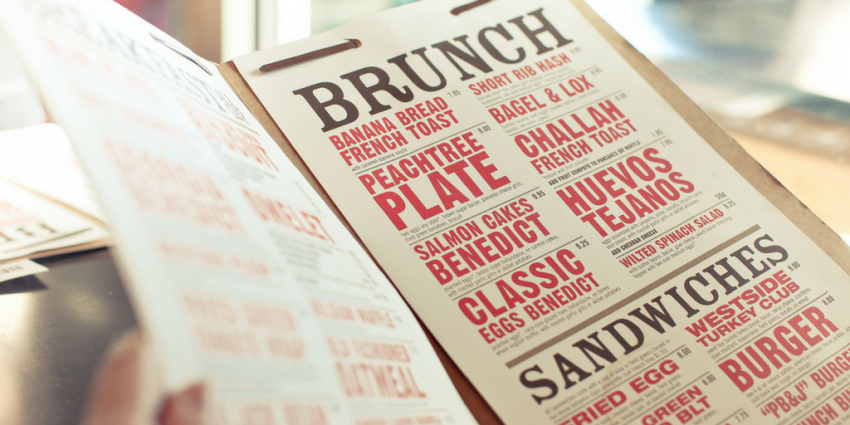
Easy to Execute Restaurant Menu Planning Ideas
Wondering how to create the right menu to make a profit and attract customers? These restaurant menu planning ideas are all you need to engineer, design, and perfect your menu.

Author
 RESOURCE
 Restaurant Menu Templates
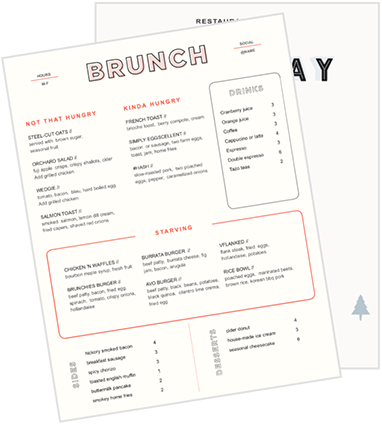
Use these menu templates as a starting point for your menu design or to give your menus a refresh.
Get Free DownloadOne of the first things your guests will look at after entering the restaurant is the menu. This is where they get the first glimpse of what the food would look and taste like. It’s also a key selling tool for your restaurant. Whether it’s printed, online, or on a menu board above a counter, a well-designed menu can boost your profitability while enhancing the guest experience.
Before we get into a step-by-step guide on how to plan, design, print, and promote your menu, let’s learn where to begin. For inspiration, check out these free, customisable restaurant menu templates.
Restaurant Menu Templates
Use these menu templates as a starting point for your menu design or to give your menus a refresh.

Download these 17 free, customisable, and print-ready menu templates to update your restaurant's menu and refresh your restaurant brand.
How Many Items Should be There on a Restaurant Menu?
The short answer is “fewer than you might think”! According to George A. Miller, a cognitive psychology expert, most people can only retain seven pieces of information at a time. That doesn’t mean you should only have seven menu items. But it means categorising your menu items and keeping the offerings within each category between three and seven will make the menu more accessible for your customers.
People these days love visiting speciality restaurants. Gone are the days of the enormous restaurant menu with dozens of options. For most restaurants, a massive menu can hurt profitability in the form of unused or spoilt inventory. People want to have fewer items but with great quality across the board.
Why Proper Restaurant Menu Planning is a Gamechanger
Restaurant menu planning can have a severe impact on your establishment’s profits. After all, this is one of the first steps that define how the experience is going to feel for your customers. If your least profitable item is the most prominent on the menu, your guests will order it time and again, instead of considering other options that are equally delicious but more profitable for your business.
If your food is your art, your menu is your canvas. An organised menu can help your wait staff to upsell different food items to your customers. They can also guide the customers through ordering. For example, telling them what drinks pair well with certain food items and what dishes should be ordered in a larger quantity. Browsing through the menu should feel like reading a brand story; enticing, but not too long.
Additionally, you should also follow the same brand guidelines for your menu as your website, social media, signage, etc. Everything should feel a part of the same overarching idea.

Subscribe to On the line
Sign up to get industry intel, advice, tools, and honest takes from real people tackling their restaurants' greatest challenges.
By submitting, you agree to receive marketing emails from Toast. We’ll handle your info according to our privacy statement. Additional information for California residents available here.
How to Create a Restaurant Menu
A restaurant menu is a printed or digital copy of a list of the items your restaurant serves. It gives a quick understanding of your offerings to your customers when it comes to the cuisine, pricing, and pictures. Every restaurant’s menu will be unique to its key theme or brand persona. But if you’re just starting off, you can cover basic features so the menu is easy to browse through for your customers.
Whether you’re planning to hire experts for this or DIY-ing it, this guide consists of everything you need to keep in mind while creating a restaurant menu.
1. List out all the menu items
Before you directly jump into designing your menu, let’s take a couple of steps back. First and foremost, you need to list down all the menu items your restaurant would serve. You’ll need to create this list after discussing it with your chefs, prep team, and partners. For the ease of designing, you should make a digital list of all the menu items on Google Sheets or Microsoft Excel. If you’re looking for some help, our menu templates come tried and tested.
2. Categorise all the menu items
It’s important to systemise your menu items into categories so the customers don’t have difficulty in finding what they need to order. You can have appetisers, entrees, desserts, etc. as the overarching categories. Organise it in a way that best promotes the cuisine and helps the customer you’re serving. Then, decide which menu items you want to appear most prominently on the menu; you may want appetisers to appear at the top of your menu, and you may want a particular appetiser to be at the top of the list because it's a star. It may be high profit, high popularity, according to your menu engineering worksheet. Simply move around your menu items until they're in the exact order you want them to appear on the menu.
3. Set menu pricing
This is the section of your menu engineering worksheet where you’ll spend plenty of time. You’ll have to look at competitors, industry rates, and ingredient costs before you decide on the pricing for your food items. These prices aren’t decided arbitrarily, and they warrant a food cost deep-dive.
Pricing is also a part of your brand strategy. Lower prices may make you seem “substandard”, whereas higher prices may indicate some sense of luxury. If you're working off of a previous menu, start by adding in your current prices. Then take a step back to analyse them. Put yourself in your customers' shoes. Based on the restaurant sales data in your point of sale system, could you afford to tweak this menu item’s price a little bit to make it more appealing?
Additionally, you should consider highlighting that an increase in price is reinvested in staff or for a good cause. The language should focus on gratitude. Go with something that says, “Thanks to this small increase in our prices, we’ve been able to support our kitchen and wait staff better.”
If you're starting from scratch, you’ll need to figure out a balance between enticing prices and profitability. Our menu engineering course can help you learn how to make data-based decisions on how to price your menu. This is based on your inventory prices and food cost percentages. Even established restaurants could benefit from a refresher on how to use data to make these types of decisions.
4. Creating menu descriptions
While you could just give AI a prompt to create product descriptions that sound fancy, you need to focus on something more: convincing your audience. Branding content may seem easy, but these are the levers you could also use to drive communication across the board. You could also hire a copywriter to write these menu descriptions for you.
They’ll have to interview your chefs or cooks to understand exactly how the food is prepared and served. The story behind the creation and serving of a specific food item is what drives the customers to finally try it. Remember to use descriptive adjectives like refreshing, crispy, savoury, tangy, sour, sweet, or crunchy wherever possible to give your customers a sense of the dish.
Take into consideration what a new vs. loyal customer would think about while going through the menu and how you can convince them to buy a certain item. It’s also important to preempt certain questions about allergens and flavours the customers might have so you could address them in the menu.
5. Decide on a menu colour scheme
Once you’ve listed all the items on a sheet, it’s time to focus on something more colourful. Think, menu colour schemes. If you already have brand guidelines, you can simply pick up the menu colour from there. However, if you’re starting this afresh, you’ll have to focus on how much you’re willing to spend on a colourful menu vs. black and white.
Of course, having consistent colours will help customers remember your brand better in the long run. But if you’re printing out temporary menus, you need to first get the structure and sizes right. You could also print out limited menus with your desired colour scheme to test how your customers react to it. Use these colour tools designs swear by:
6. Designing your restaurant menu
This is probably the most time-consuming part of it all. Once you’ve nailed what you’re going to be serving and got confirmation from your partners, it’s time to put it all together. This is where you’ll have to decide how you’re going to arrange the items in the menu and what the additional elements like spacing, margins, elements, photos, etc. would look like. If you're hiring a designer, simply giving them your menu item spreadsheet and colour scheme makes their life so much easier.
If you’re going to be designing the menu yourself, you can use softwares like Microsoft Word, Microsoft Powerpoint, Canva, or the Adobe Suite and use their menu templates as a starting point. Keep these best practices in mind as well:
Your menu should be easily readable and digestible: the more items you add, the more complicated it gets. In the beginning, focus on getting the key dishes out there on the menu so your customers have a basic overview of the restaurant.
Remember the golden triangle. Our eyes typically start in the middle of a page, then move to the top right and top left, so consider putting high-margin dishes at the centre and upper right corner of your menu.
Use pound signs strategically. A study at Cornell found that diners who ordered from a menu without pound signs (£) spent significantly more than those who ordered from a traditionally priced menu. Consider removing pound signs from your menu, and don't list menu prices in a single column so it's easy for customers to compare.
7. Restaurant menu photos
When you have printed menus, your customers can clearly see how the food looks and read the descriptions easily. The more distracting your menu is, the longer customers will take to order something or add more items to their bill. Ensure you have enough negative space so the menu looks clean.
Don’t skip out on adding pictures to the menu. If you serve a unique cuisine or food item, you might want to support them with pictures. Additionally, these photos need to be high quality and should be translated when the menu is printed too. You may have to hire a food photographer to take these photos because low-quality photos can be as distracting as too many elements. You’ll also have to spend some time cracking the plating of the food to make it look aesthetically pleasing.
The best part about hiring a photographer is that you can use these high-quality pictures on your social media as well. Make sure to also include a link to your digital menu in your social media bios so users can check out your menus before stepping foot in your restaurant.
8. Prepare and verify optimal design guidelines
If you already have a brand designer you work with for print projects, you could outsource this part of your business entirely to them. You can still share your general idea of how you want the menu to be designed and where the items will be placed. In case you’re DIY-ing it, you can choose from Toast’s elaborate restaurant menu templates.
Depending on how elaborate your menu is, it can take anywhere between a day and a week to create a menu. You’ll have to go through different iterations, considering margins, spacing, fonts, and overall composition. Depending on the vibe of the restaurant, you can showcase different elements. For example, The Ship Greenwich Pier and The Little Yellow Door have menus unique to their themes. You could do something similar or keep it simple, too.
Also, don't forget: updating your menu regularly should be easy. If you don't leave space to add or remove menu items over time, especially if your menu changes seasonally, then you may have to start this whole process over again. As many guests, especially the loyal ones that keep coming back, will remember your menu design and where to find their favourite items, you'll want to make sure it's easy to update, so you don't have to overhaul your menu design again and again.
9. Select the final menu layout
Before finalising the design for your menu, ensure that it meets the brand guidelines set up by your design team. You could come up with a few design choices to share with your business partners and staff and vote on which you think is best for your restaurant brand. Post this, your stakeholders will want to review the content of the menu, descriptions, and the pictures you’re using. This is where you need to maintain the tone of voice guidelines on which your brand persona is built. Once the design gets approved on all levels, you can select the menu that looks best to both the internal teams and your customers. If you think a certain design would perform better on the basis of your restaurant point of sale, feel free to build your case.
You could also A/B test your menus by printing them in limited numbers and taking feedback from your customers in exchange for a freebie.
10. Proofread and print your menu
The last step in the process is printing your restaurant menu. You’re one step closer for your customers to actually take a look at what you offer. But before you hit print, take a moment to proofread your menu and send it to someone who hasn't been staring at it for the past week. Basically, someone with a fresh perspective should look at your menu before you make it real. Even though the audience is all about being ‘quirky’ when it comes to restaurant menus, they still need to be legible.
One misplaced comma or small typo could change your guests' perception of the restaurant. Make this step a part of your regular process so you don’t end up printing menus that won’t work and end up incurring another expense. When you're ready to print, you could simply use Ryman printing service to print on quality paper for cheap or use one of these restaurant menu printing services:
The cost of printing depends on how many menus you want, but printing approximately 200 8.5” by 11” menus can cost between £150 and £200.
Creating a Restaurant Menu Online
Your online menu for the restaurant should be a reflection of the physical menu. It’s important to follow the same guidelines related to the descriptions as your print menu. In fact, digital menus give you space to add more details, and some online ordering providers let you upload pictures, too. So when guests are ordering online, it gives them a clear picture of what they’re ordering. Since you don’t have the support of waitstaff online, it’s important to give your customers all the necessary details across platforms.
A strategic way to go about this is by creating a spreadsheet of menu items and categories on your online ordering platform. Then, you can input your menu items one by one. In case you want to do away with print menus at your restaurant, you can give your customers access to a QR code that leads them to the online menu. Once done ordering, their order gets recorded on the POS system. This new way of ordering puts your guests in control of their dining experience, and the menus never get taken away so they can keep the orders coming all night.
Hone Your Menu Engineering Skills
You’ve finally got your restaurant menu printed and set up online to be used! But this is just the beginning. As the time goes by, you’ll have to take note of what your customers order. This will help in rearranging items for access and putting the bestsellers at the top to get more customer attention. You’ll also be able to see trends and adapt to them quicker. This will help in keeping things fresh and the revenue flowing. If you’re curious to understand the trends better, you can use this menu engineering worksheet to analyse how each of your menu items is performing and it will guide your next menu redesign.
Related Resources
Restaurant Menu Templates
Use these menu templates as a starting point for your menu design or to give your menus a refresh.
Is this article helpful?
DISCLAIMER: This information is provided for general informational purposes only, and publication does not constitute an endorsement. Toast does not warrant the accuracy or completeness of any information, text, graphics, links, or other items contained within this content. Toast does not guarantee you will achieve any specific results if you follow any advice herein. It may be advisable for you to consult with a professional such as a lawyer, accountant, or business advisor for advice specific to your situation.
Subscribe to On the line
Sign up to get industry intel, advice, tools, and honest takes from real people tackling their restaurants' greatest challenges.
By submitting, you agree to receive marketing emails from Toast. We’ll handle your info according to our privacy statement. Additional information for California residents available here.