
Food Inventory Template: A Simple Way to Track Every Ingredient
Keeping track of food is tough in a busy kitchen. Use a food inventory template to reduce waste, streamline prep, and protect your margins.

Autor
 RECURSO
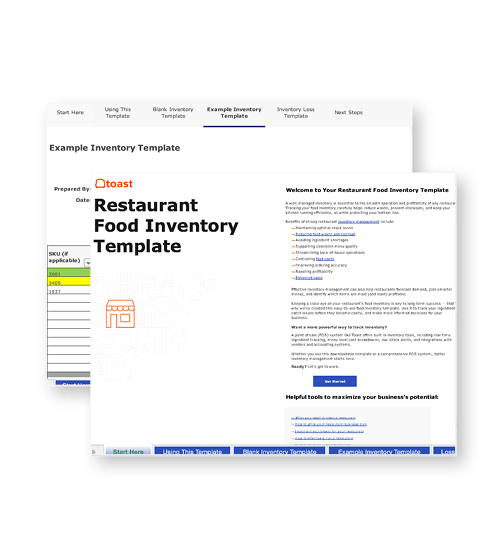
 Plantilla de inventario de alimentos para restaurantes
Utiliza esta plantilla gratuita de inventario de alimentos para ayudar a tu empresa a mantenerse organizada y gestionar el inventario con facilidad.
Obtener descarga gratisIn a busy kitchen, it’s easy to lose track of what’s in the cooler, pantry, or prep station. With food prices rising and margins tighter than ever, keeping an organized system for tracking inventory isn’t just a nice-to-have — it’s essential for staying profitable.
A recent survey found that 35% of operators already use AI for inventory management and menu optimization. But even the smartest technology depends on accurate, consistent data. Success starts with the basics: a reliable food inventory template.
Key takeaways
A food inventory template helps you track every ingredient across storage areas and prep stations.
Organized inventory reduces waste, prevents spoilage, and keeps your kitchen efficient.
Tracking par levels and unit costs supports smarter ordering and better cost control.
Templates should capture key details like item name, unit size, expiration date, and location.
Consistent use creates accountability across your team and ensures menu consistency.
Plantilla de inventario de alimentos para restaurantes
Utiliza esta plantilla gratuita de inventario de alimentos para ayudar a tu empresa a mantenerse organizada y gestionar el inventario con facilidad.

What is a food inventory template?
A food inventory template is a simple but powerful tool for keeping track of every ingredient in your kitchen — from fresh produce and proteins to dry goods, dairy, and prepared items. It records key details like unit sizes, costs, and expiration dates, giving you a clear snapshot of what’s on hand at any given time.
Unlike bar inventory sheets, a food inventory template is designed specifically for the unique challenges of managing a kitchen. Because food is perishable, varied, and often stored across multiple locations, it requires extra attention to details like rotation, shelf life, and par levels.
Why should you use a food inventory template?
Running a kitchen without a clear system for tracking ingredients can quickly lead to problems: unexpected shortages, costly over-ordering, and unnecessary food waste.
Since food costs make up one of the largest expenses for restaurants, a reliable food inventory template is one of the easiest ways to keep spending under control while ensuring consistency on the menu. It helps you:
Prevent spoilage: Track expiration dates so ingredients are used before they go bad.
Streamline prep: Know exactly what’s in stock to plan daily and weekly prep lists.
Spot trends: Identify which ingredients move quickly and which sit unused, guiding menu adjustments.
Reduce last-minute orders: Use par levels to order efficiently and avoid costly emergency supplier runs.
Control food costs: Track unit costs and quantities so portioning and menu pricing stay profitable.
Improve accountability: Create a shared record that keeps chefs, line cooks, and managers on the same page.
What to include on your food inventory template
A good food inventory template should be simple to update, easy for staff to understand, and tailored to how your kitchen operates. At a minimum, it should capture the essential details that keep your storage areas organized and your costs under control.
That starts with giving every ingredient a clear “home” in your walk-in, freezer, or storeroom, and making sure your template matches that layout. As the National Restaurant Association points out, organizing and labeling shelves by ingredient — and then recording those slots in your sheet with the right unit of measurement — makes inventory much easier to track.
For example, you might log frozen French fries by the case in the walk-in, by the 5-lb bag in the reach-in freezer, as “each” in pre-portioned bags on the line, and by the ounce loose in a pan. By reflecting these storage differences in your template, your team can count quickly and accurately without confusion. Here are the core fields your template should include:
Item name: Be specific — “Russet potatoes, 50 lb case” is clearer than just “potatoes.”
Category: Group items by produce, protein, dairy, dry goods, or prepared foods.
Unit size: Note whether it’s measured in pounds, gallons, cases, or individual containers.
Quantity on hand: Track both full and partial units.
Par level: The minimum amount you want in stock before reordering.
Unit cost: How much you pay per pound, case, or container.
Total value: Quantity × unit cost (useful for food cost control and budgeting).
Expiration or use-by date: Critical for avoiding spoilage and ensuring FIFO (first in, first out) rotation.
Storage location: Walk-in cooler, freezer, dry storage, or line station.
Supplier/vendor: Makes reordering quick and straightforward.
Notes: Add prep instructions, rotation details, or allergen information (e.g., “Gluten,” “Contains nuts”).
Food inventory template example
A food inventory template brings all your ingredient details into one place so your team can see at a glance what’s in stock, what’s running low, and what needs to be reordered. Some kitchens prefer a printed sheet on a clipboard for quick checks during prep, while others use a digital version in Google Sheets, Excel, or inventory software for real-time updates.
Your template might have more or fewer fields depending on your workflow, but including the essentials — like categories, unit size, expiration dates, and storage locations — ensures anyone on the team can understand stock status and make smart ordering decisions. Here’s an example of what your food inventory template might look like:
Item name | Category | Unit size | Quantity on hand | Par level | Unit cost | Total value | Expiration date | Location | Supplier | Notes |
Chicken breast | Protein | 40 lb case | 2 | 3 | $90/case | $180 | 8/10/25 | Walk-in cooler | Poultry Supply Co. | Rotate daily |
Roma tomatoes | Produce | 25 lb box | 1 | 2 | $22/box | $22 | 8/05/2025 | Dry storage | Fresh Farms Inc. | Use in salsa |
Mozzarella cheese | Dairy | 5 lb bag | 6 | 4 | $18/bag | $108 | 8/20/2025 | Cooler | Dairy Co. | Track open bags |
Olive oil | Dry goods | 1 gal jug` | 3 | 2 | $14/jug | $42 | N/A | Pantry | Italian Imports | For dressings |
Pesto sauce | Prepared | 1 qt tub | 2 | 2 | $12/tub | $24 | 8/08/2025 | Line station | Specialty Foods | Open tub expires in 5 days |
How to use your food inventory template
The more consistently your team updates and uses the sheet, the more accurate your data will be — and the easier it becomes to control food costs and keep your kitchen running smoothly. As one Los Tacos operator explains:
“Instead of giving the managers broad information like ‘your food cost is high,’ [with recipe costing] we are now able to tell the managers exactly which specific products we are having issues with.”
A well-maintained template provides that level of clarity — pinpointing exactly where problems lie so you can make smarter, more targeted decisions. Here are some best practices for getting the most out of your template:
Assign a point person: Designate a sous chef, line cook, or manager to handle counts so the process stays consistent.
Count regularly: Many kitchens do full counts weekly, with daily spot-checks for highly perishable items like produce and dairy.
Track expiration dates: Rotate stock using FIFO (first in, first out) so older items are used before newer ones.
Update immediately: Log new deliveries and adjust quantities as items are prepped or used.
Cross-check with sales data: Compare menu item sales with ingredient usage to spot variances early.
Use par levels to order: Let your template guide purchasing decisions so you avoid both over-ordering and running out mid-service.
Keep it accessible: Post a clipboard version in the walk-in or use a shared digital sheet so staff can make quick updates during prep.
Food for thought (and inventory)
Food costs are one of the biggest expenses for any restaurant, and even small inefficiencies can add up fast. Smart inventory management helps you reduce waste, keep shelves organized, and ensure your team always has the ingredients they need to deliver consistent, high-quality dishes.
Plantilla de hoja de inventario de PAR
Realiza fácilmente un seguimiento de tu inventario con la ayuda de esta plantilla de hojas de inventario de PAR personalizable.
FAQ
What should be included in a basic food inventory template?
At minimum, your template should include item names, categories (produce, dairy, proteins, dry goods), units of measure, quantities on hand, unit costs, and total value. Many templates also include vendor information, reorder points, and space for notes to make restocking easier.
How often should I update my food inventory template?
Most restaurants update inventory weekly, though high-volume operations or those with perishable items may do it daily. Consistent updates help catch shrinkage, reduce waste, and keep ordering accurate. The key is to choose a schedule that aligns with your sales volume and food turnover.
Can I use a simple Excel template for restaurant inventory?
Yes. Many small and mid-sized restaurants start with Excel or Google Sheets because they’re easy to customize and share with staff. As your business grows, you may eventually switch to dedicated software for more automation and real-time insights, but spreadsheets are an effective starting point.
How do inventory templates help reduce food costs?
Templates make it easier to track usage patterns, identify waste, and avoid over-ordering. By monitoring stock levels consistently, you can spot items that aren’t selling, adjust order quantities, and improve your food cost percentage. This visibility directly translates into savings and higher profitability.
What's the difference between inventory templates and inventory management software?
Templates are manual tools — you enter and update data yourself. They’re inexpensive and customizable but can be time-intensive. Inventory management software automates much of the process, integrates with POS systems, and provides real-time analytics. While templates are great for smaller restaurants, software becomes more efficient as your operation scales.


¿Es útil este artículo?
AVISO LEGAL: Esta información se proporciona solo con fines informativos generales y su publicación no constituye un aval. Toast no garantiza la precisión ni la integridad de la información, el texto, los gráficos, los enlaces y otros elementos que incluye este contenido. Toast no garantiza que alcanzarás ningún resultado específico si sigues los consejos que aparecen aquí. Te recomendamos consultar con un profesional, como un abogado, contador o asesor comercial, para recibir asesoramiento específico para tu situación.
 Tendencias



Subscribe to On the line
Sign up to get industry intel, advice, tools, and honest takes from real people tackling their restaurants' greatest challenges.
Al enviar, aceptas recibir correos electrónicos de marketing de Toast. Trataremos tu información de acuerdo con nuestra declaración de privacidad. Información adicional disponible para residentes de California aquí.