The Ultimate Comparison of Android vs. iPad POS Systems for Restaurants
Not all POS systems are created equal. See how Android and iOS POS systems stack up — and why Android-powered Toast is the smarter choice for your restaurant.

作者
 资源
资源 In 2026, cloud-based POS systems have become the default choice for restaurant owners, and for good reason. The benefits are hard to ignore: lower upfront costs, greater mobility through handheld devices, real-time data access, and faster feature updates that keep pace with an ever-changing industry.
But not all cloud POS systems are created equal. The device you run them on matters just as much as the software itself.
Handheld devices built on Android hardware can do things iPads simply can't: increase server efficiency on the floor, create more natural guest interactions, and withstand a busy restaurant environment. When it comes to durability and flexibility, both in hardware options and software customization, Android POS systems have a clear edge.
So what exactly sets them apart? Below, we break down four essential features that distinguish Android and iPad POS systems and show you why the device choice could have a bigger impact on your operation than you might expect. To evaluate your options along the way, download our POS Comparison Guide or explore the Toast vs. Competitors page.
餐厅经营计划模板
无论您处于餐厅经营的何种阶段,一份经营计划都将是您的指路明灯。利用这份免费模板梳理自己的愿景,确保万无一失。

Android POS Systems vs. iPad POS Systems
Before we get into the details, here's the high-level answer to the question restaurant owners are increasingly asking:
What is an Android POS system for restaurants? An Android POS system is a point-of-sale platform that runs on the Android operating system. This could be either on purpose-built restaurant hardware (like Toast terminals) or on commercial Android tablets.
Because Android is open-source, restaurant POS companies can build deeply customized software experiences, integrate with a wide range of peripherals, and push updates without the delays imposed by Apple's App Store review process.
How does an Android POS differ from an iPad POS? iPad POS systems run on Apple's iOS, a closed ecosystem with tighter restrictions on how apps are built and updated. While iPads can be sleek and familiar, they weren't designed for the demands of a commercial kitchen. Android POS systems, particularly those built specifically for restaurants, tend to offer more customization, more hardware options, and greater durability in high-stress environments.
Now, let's dig into the four features that make Android the smarter choice for most restaurants.
1. A highly customizable experience
Android, as a mobile operating system, is known for being flexible. It can give developers far more control over the software and in-app experience. Apple's closed ecosystem not only governs which apps make it into the App Store, but also limits how much developers can customize the behavior of those apps once they're there.
What this means for restaurants
Flexibility is a requirement in the restaurant industry because no two restaurants operate the same way. From kitchen workflows and menus to tip pooling policies, there are hundreds of variables a POS system needs to accommodate.
Even a one or two-second delay in closing out a check can create a ripple effect across an entire shift. Toast customers, for example, have requested highly specific customizations, larger fonts for kitchen printers, bigger POS screen buttons, and granular control over tip distribution between tipped and non-tipped employees. Android POS systems can adapt to a restaurant's workflow rather than forcing the restaurant to adapt to the limitations of what an Apple-approved app will support. That distinction becomes critical when every second and every order counts. If your restaurant has unique operational needs, and every restaurant does, an Android POS gives you the flexibility to build around them. An iPad POS asks you to work around it.
2. Faster software updates mean fewer disruptions
Both Android and iOS deliver regular software updates. But there's a key structural difference in how those updates reach your POS and what happens when something breaks.
With iOS, every update to an app must go through Apple's review and approval process before it reaches the App Store. That means when a new iOS update causes an iPad POS system to crash or behave unexpectedly, the POS provider has to: identify the issue, develop a fix, submit it to Apple for review, wait for approval, and then publish the update. It's not uncommon for restaurant operators to receive urgent emails from their POS vendors warning them not to install a new iOS update until the software company can push a compatible version through Apple's queue.
What this means for restaurants
Android's open system means OS updates cause far less disruption to the app layer. When a bug or incompatibility arises, developers can push fixes directly without waiting on a third-party gatekeeper.
In a restaurant, POS downtime isn't just an inconvenience. It's lost revenue, frustrated staff, and a degraded guest experience. Every minute your system is down during a dinner rush has a direct cost. Faster update cycles and fewer update-related crashes mean your system will continue to function as it should.
Faster updates mean your POS keeps pace with your business. With Android, you're not at the mercy of Apple's approval timeline when something needs to be fixed.
3. Better hardware options for your restaurant type
Apple offers a limited range of hardware form factors: iPads ranging from 8 to 12 inches and the iPod Touch at around 5 inches. That's a short menu for an industry with enormous operational diversity.
Android hardware spans dozens of manufacturers and hundreds of device models, from 5-inch handheld devices that fit in a server's pocket to countertop terminals upward of 22 inches. Purpose-built Android restaurant hardware like Toast's lineup is engineered for the specific demands of the restaurant environment, including kitchen display systems, handhelds, and customer-facing kiosks.
What this means for restaurants
Hardware directly affects how your team operates. One device size does not fit all. Android's hardware ecosystem lets you build a setup that fits your restaurant, not the other way around.
With Android, you choose the hardware that fits your concept. With an iPad, you choose from what Apple makes.
4. Durable, affordable, and built with restaurants in mind
Your home kitchen and a commercial restaurant kitchen have almost nothing in common. The grease, the spills, the drops — the physical punishment that restaurant hardware absorbs in a single week would destroy a consumer-grade iPad in short order.
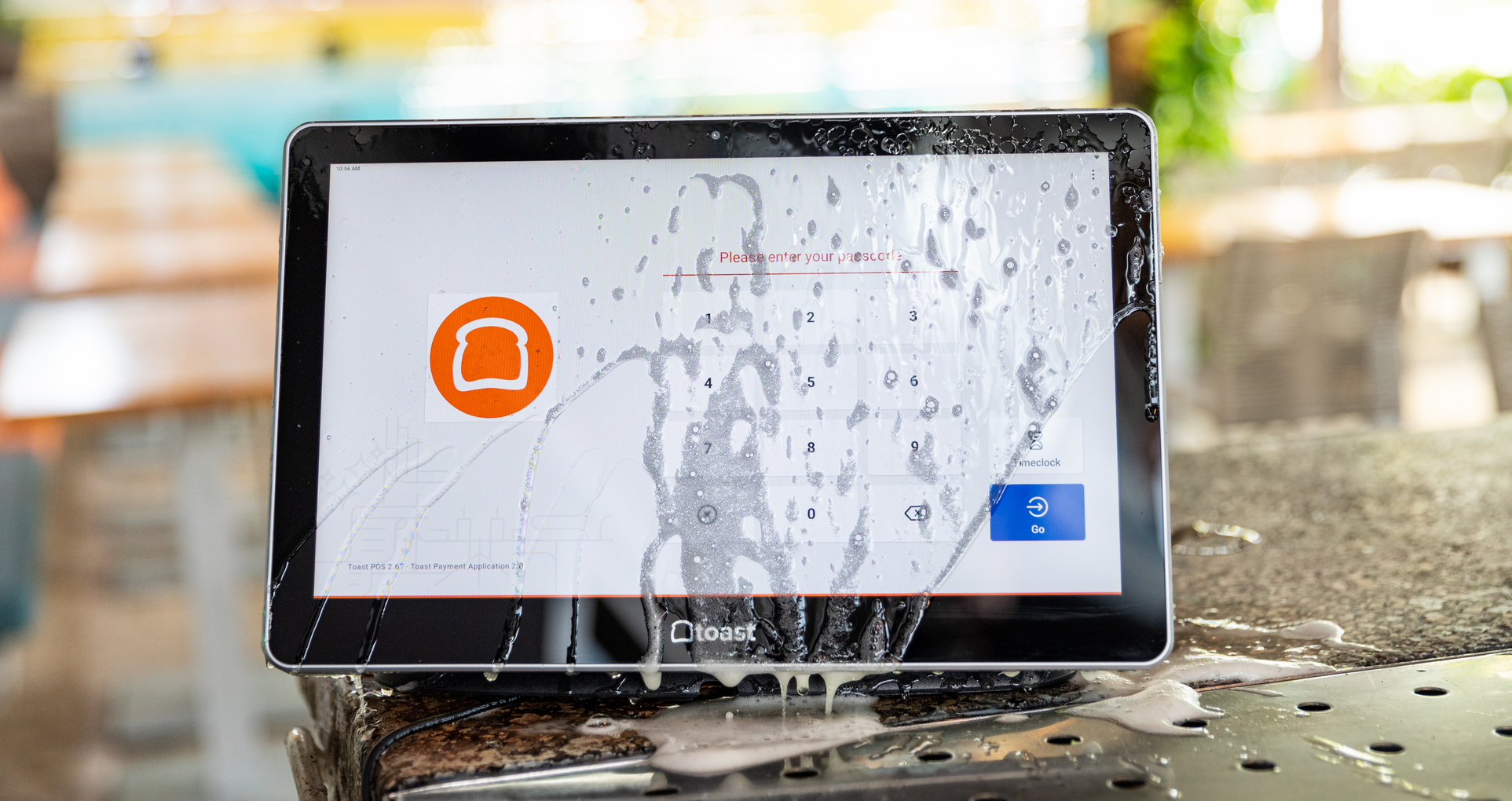
Many Android device manufacturers specialize in building hardware specifically for commercial foodservice environments. Toast Go® 3 features:
Drop rating: 5 ft
IP Rating: IP65 protection from dust and liquids
Battery: 24+ hours
Wi-Fi connectivity: 6 2x2 MIMO
4G cellular (for applicable models)
…and is compact enough (6.52 in) to fit in a server's apron pocket. That's not an accident; it's the result of building hardware around how restaurants actually operate.
What this means for restaurants
Beyond durability, Android hardware is significantly more cost-effective than Apple hardware. If a server drops an iPad on tile, you're looking at a costly repair or replacement of a premium consumer device. Android restaurant hardware is designed to take that hit and keep working.
餐厅利润率计算工具
使用此免费的餐厅利润率计算工具,了解您将餐厅销售额转化为利润的效率如何。
Why should I use an Android POS?
According to Toast, 61% of diners agree that server handheld tablets improve their guest experience, but that's only true when the hardware actually holds up through a double-shift dinner rush.
Take Toast vs. Square, for example. Square’s handheld hardware leans on iPads and consumer-grade devices not engineered for commercial kitchens. Toast Go® 3, by contrast, was built from the ground up for food service environments — spill-resistant, grease-resistant, and drop-tested up to 5 feet. It carries a higher IP rating than Square Handheld for liquid and dust resistance, and offers cellular connectivity for added range and Wi-Fi alternatives over Square, which is limited to Wi-Fi and offline mode.
In a busy dining room, connectivity gaps mean missed orders. Fragile hardware means downtime at the worst possible moment. The right Android POS enables your team to do what they do best.
There are hundreds of things that can go wrong on any given shift. Your POS system shouldn't be one of them. Learn more here.
FAQs
What is the best Android POS system for restaurants?
Toast is widely regarded as a leading Android-based POS system purpose-built for restaurants. It combines custom hardware with restaurant-specific software for order management, payments, kitchen display, online ordering, loyalty, and team management — all on a single platform.
Is Toast an Android POS system?
Yes. Toast runs on Android and uses custom-built Android hardware, including handheld devices (Toast Go® 3), countertop terminals, kitchen display systems, and kiosk hardware. Toast can offer the flexibility, customization, and hardware variety that iPad-based systems cannot.
Why do restaurants use Android instead of iPad for their POS?
Restaurants favor Android POS systems for four primary reasons: greater software customization, faster update cycles (no App Store approval delays), a wider range of hardware form factors, and more durable, affordable hardware built for commercial environments.
How much does an Android restaurant POS system cost?
Costs vary by provider and configuration. The upfront costs for Toast are hardware and implementation*, which vary depending on your specific hardware packages and installation needs. Toast has flexible payment options available, including payment as a percentage of your sales** or a fixed monthly payment using a third-party financing partner. These solutions are not just for restaurants with great credit; they have no interest or fees, and the Easy Pay option has a 100% approval rate and no credit check***.
What features should I look for in a restaurant Android POS system?
Key features to evaluate include: tableside ordering capability, kitchen display system (KDS) integration, online ordering and delivery integrations, inventory management, loyalty and CRM tools, real-time reporting and analytics, and robust customer support. The hardware's durability, battery life (for handhelds), and form factor options are equally important considerations.
* Includes installation, shipping, handling, and taxes.
** Pricing applies to new customers and single locations only.
*** Toast Easy Pay is a 180-day lease with an option to purchase. Toast will hold back 1.75% of your sales and any unpaid amount will be due at 180 days via ACH. Software is billed monthly.
餐厅开办计算工具
此计算工具列出了开办餐厅所需的一些基本财务成本,您可以据此开始规划并开办自己心目中的餐厅。


这篇文章有帮助吗?
免责声明:此信息仅作为一般性参考,发布并不构成认可。Toast 不保证本内容中包含的任何信息、文本、图形、链接或其他项目的准确性或完整性。Toast 不保证如果您遵循本文的任何建议,就能取得任何特定结果。您可能需要咨询专业人士,如律师、会计师或商业顾问,以获取针对您情况的具体建议。
 趋势
趋势