What Is a Restaurant Kiosk? 8 Benefits of Self-Service Ordering
What is a restaurant kiosk? See how self-ordering touchscreens cut wait times, lower labor costs, and boost check averages for quick-service and fast-casual restaurants.
작성자
 RESOURCE
 Restaurant Equipment Checklist
Opening or upgrading a restaurant? Don't miss any essential equipment! Download our free, comprehensive restaurant equipment checklist.
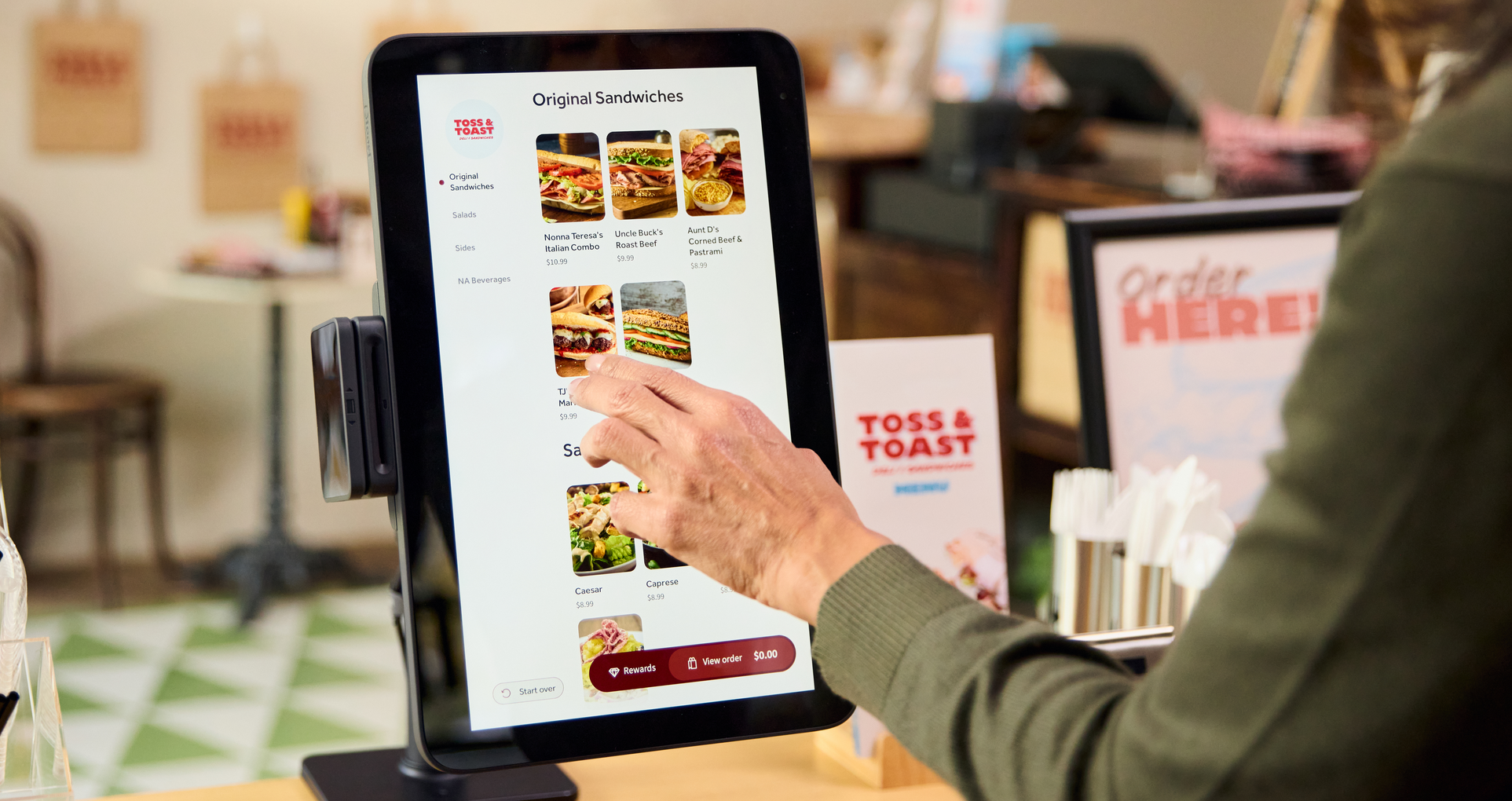
무료 다운로드 받기A restaurant kiosk is a self-service ordering and payment station that lets guests browse the menu, customize items, place an order, and pay without waiting for a cashier. For quick-service, fast-casual, café, and other counter-service concepts, kiosks can add ordering capacity while giving customers more control over the experience.
However, an effective kiosk needs to do more than display a digital menu. It should connect orders with restaurant payments, kitchen workflow, and loyalty. Toast’s Restaurant Kiosk sends guest orders directly to Toast POS and kitchen operations, helping teams reduce manual entry while staying focused on food preparation, customer assistance, and hospitality.
In this guide, we’ll explain how restaurant kiosks work, which restaurants benefit most, and the features operators should consider before adding self-service ordering.
Key takeaways
Restaurant kiosks let guests browse, customize, order, and pay independently.
Kiosks can add ordering capacity during busy periods.
Integrated kiosks send orders directly to the POS and kitchen.
Digital prompts can support upselling and loyalty enrollment.
Kiosks work best with clear menus, reliable technology, and staff support.
Restaurant Operations Manual Template
Use this free template to easily outline all of your operating procedures and make day-to-day operations as consistent as possible.

What is a restaurant kiosk?
A restaurant kiosk is a self-service ordering and payment station that allows guests to complete some or all of the ordering process without a cashier. Depending on the system, a restaurant kiosk may let customers:
Browse menu categories
View product images and descriptions
Select modifiers and substitutions
Add allergy or dietary information
Choose dine-in, takeout, or curbside pickup
Join a loyalty program
Pay for the order
Request a digital receipt
Receive a text when the order is ready
A restaurant kiosk is different from a digital menu board because it's interactive. Guests don’t simply view the menu; they build and submit an order directly through the screen.
How does a restaurant kiosk work?
A restaurant kiosk guides the guest through a digital ordering flow before sending the completed order into the restaurant’s operating system.
Ordering stage | How a restaurant kiosk supports it |
Menu browsing | Displays items, categories, descriptions, images, and prices |
Customization | Presents modifiers, substitutions, sizes, and add-ons |
Order review | Lets guests confirm items, quantities, and selections |
Checkout | Accepts payment and may invite loyalty enrollment |
Order routing | Sends the ticket to the POS and kitchen |
Preparation | Gives kitchen employees a digital production ticket |
Pickup | Displays an order number or sends a ready notification |
Reporting | Records kiosk sales alongside other ordering channels |
Why should your restaurant use kiosks?
Restaurant kiosks can improve the guest experience as well as day-to-day operations. Here are eight ways self-service ordering can support customers, employees, and restaurant performance.
1. Give guests more control over ordering
Kiosks let customers browse the menu at their own pace instead of deciding while a line forms behind them. Guests can compare items, review prices, select modifiers, and check the final order before submitting it.
In Canopy’s 2025 survey, customers identified faster ordering, additional browsing time, easier customization, and greater order accuracy as leading reasons for using kiosks.
Toast’s Restaurant Kiosk presents digital menus and modifiers that guests can navigate independently, helping customers tailor an order without relying on an employee to enter each request.
2. Add ordering capacity during busy periods
A kiosk creates an additional ordering channel inside the restaurant. Multiple customers can place orders while employees prepare food, assist guests, manage pickup, or operate the counter.
Its main operational benefit is distributing ordering activity across more terminals and allowing employees to spend less time entering routine orders. Love’s offered a similar explanation when it installed kiosks in all 112 of its Arby’s restaurants across 30 states in 2025. Vice President of Foodservice Joe Cotton said:
“By streamlining the ordering process, our team members can dedicate more time to food preparation, optimizing the customer experience and driving loyalty… It’s another way Love’s helps customers get back on the road quickly.”
3. Support multilingual ordering
A multilingual kiosk can make menu information more accessible to guests who prefer ordering in another language. It can also reduce the need to communicate complex modifiers verbally.
The kiosks installed at Love’s Arby’s locations support English and Spanish, display an image of each item, recommend promotions, and integrate with the company’s POS, mobile ordering, and loyalty systems.
4. Support consistent upselling
Employees may not have time to recommend drinks, sides, larger sizes, or premium add-ons during every interaction. A kiosk can display the same relevant suggestion automatically whenever an order qualifies.
Toast Kiosk includes prompts and modifiers that can encourage guests to consider add-ons, upgrades, and combinations during the ordering flow.
At DK Sushi, orders placed through Toast Kiosks had a 10% higher average order value, according to the restaurant’s Toast customer story. Results vary by concept, menu, pricing, and implementation.
5. Make customization easier to review
Complex orders can be difficult to communicate verbally, especially when they involve several substitutions, modifiers, or quantities.
A kiosk displays each selection on the screen and gives guests a final opportunity to review the order. That can support accuracy by making the requested modifications visible before the ticket reaches the kitchen.
Just remember that kiosks cannot eliminate every error. Menu configuration, ingredient availability, kitchen execution, and the clarity of modifier options still affect accuracy.
6. Connect the front of house with the kitchen
A standalone kiosk may create another system for employees to monitor. An integrated kiosk carries the order directly into the same production workflow used by the rest of the restaurant.
Toast Kiosk sends orders into Toast POS and kitchen displays without third-party tools or manual re-entry. That means the guest’s selections can move from the kiosk to the kitchen as a digital ticket.
7. Simplify the pickup process
Pickup areas can become crowded when guests don’t know whether their food is ready. Employees may also lose time repeatedly calling names or order numbers.
Toast Kiosk can collect a guest’s phone number and send a text when the order is ready, helping customers wait elsewhere instead of gathering around the counter.
8. Create loyalty enrollment opportunities
A kiosk can prompt customers to identify themselves or join a loyalty program during checkout. This gives restaurants an opportunity to connect an otherwise anonymous counter transaction with a guest profile.
For instance, Toast Kiosk can invite guests to join a loyalty program directly from the checkout flow. Toast Loyalty data from Q1 2026 found that moving a guest into a loyalty program shifted the measured return rate from a 7% baseline to nearly 30%.
Just remember, the finding applies to Toast Loyalty broadly, and does not mean kiosk enrollment alone will necessarily produce the same result.
Essential restaurant kiosk features
A useful restaurant kiosk should connect the customer-facing ordering experience with the systems that employees use to prepare, fulfill, and analyze orders.
Restaurant kiosk feature | Why it matters |
POS integration | Prevents employees from manually entering kiosk orders |
Kitchen routing | Sends tickets directly into production |
Menu synchronization | Keeps products, modifiers, and prices consistent |
Clear menu design | Helps guests find items and understand choices |
Flexible modifiers | Supports substitutions and customized orders |
Upsell prompts | Presents relevant add-ons consistently |
Payment processing | Lets guests complete the transaction independently |
Loyalty integration | Recognizes members and encourages enrollment |
SMS notifications | Tells customers when orders are ready |
Custom branding | Keeps the kiosk consistent with the restaurant’s identity |
Connectivity backup | Helps maintain service during internet disruptions |
Flexible installation | Fits different entrances, dining rooms, and pickup areas |
Reporting | Tracks kiosk sales, checks, and ordering behavior |
Accessible design | Makes the kiosk usable by a wider range of guests |
What restaurants benefit most from kiosks?
Kiosks are generally best suited to restaurant concepts where guests order and pay before receiving their food. Strong use cases include:
Quick-service restaurants
Fast-casual restaurants
Cafés and bakeries
Food halls
Campus dining
Travel-center restaurants
Counter-service concepts
Restaurants with heavy peak-period lines
Restaurants with highly customizable menus
Large chains are continuing to expand kiosk deployment. Jack in the Box, for example, had installed kiosks in nearly 1,500 restaurants by May 2025, while digital channels represented 18% of its systemwide sales during the quarter. That digital percentage also included other first-party channels, so it should not be attributed entirely to kiosks.
Kiosks may be less central for restaurants where tableside recommendations, personal interaction, or high-touch hospitality define the experience. However, even in those settings, they may still support specific workflows such as takeout ordering or food-hall service.
Add self-service without removing hospitality
Restaurant kiosks can give customers more control, add ordering capacity, support customization, and connect digital orders directly with the kitchen. However, their value depends on more than installing a touchscreen.
Operators still need clear menus, reliable hardware, accessible placement, kitchen capacity, and employees who are ready to help. The best kiosk experience combines digital convenience with thoughtful hospitality.
Toast Kiosk connects guest ordering with Toast POS and kitchen operations, helping restaurants serve self-service customers while keeping employees focused on food preparation, assistance, and guest experience.
Opening a Fast Casual Restaurant Checklist
So many things go into opening a fast casual restaurant. With this free PDF checklist, you'll set your new business up for success.
FAQs
What is a restaurant kiosk?
A restaurant kiosk is a self-service station that lets guests browse, customize, order, and pay without a cashier.
Do restaurant kiosks replace staff?
No, kiosks reduce routine order entry while employees focus on food preparation, assistance, pickup, and hospitality.
What types of restaurants use kiosks?
Kiosks are most common in quick-service, fast-casual, café, food-hall, campus, and other counter-service concepts.
How do restaurant kiosks integrate with a POS?
An integrated kiosk sends orders and payments directly to the POS and kitchen without manual re-entry.
Can kiosks support loyalty programs?
Yes, kiosks can recognize loyalty members and invite new guests to enroll during checkout.
What should I look for when choosing a kiosk system?
Look for POS integration, kitchen routing, clear menus, flexible modifiers, payments, loyalty, reporting, accessibility, and reliable connectivity.


이 문서가 도움이 되었나요?
면책 조항: 이 정보는 일반 정보 제공 목적으로 작성되었으며 당사의 권고를 의미하는 것은 아닙니다. Toast는 본 콘텐츠에 포함된 정보, 텍스트, 그래픽, 링크 및 기타 항목의 정확성이나 완전성을 보장하지 않습니다. Toast는 본 문서의 조언을 따른다고 해서 특정한 결과를 얻을 수 있음을 보장하지 않습니다. 귀하의 상황에 맞는 조언이 필요한 경우 변호사, 회계사 또는 비즈니스 자문가 등 전문가와 상담하시기 바랍니다.
