The Best POS System for Cafe: 7 Must-Have Features (2026)
You opened your cafe because you love coffee and hospitality, not cash registers. We're here to break down the top options by features, pricing, and what matters most to cafe owners.
作者
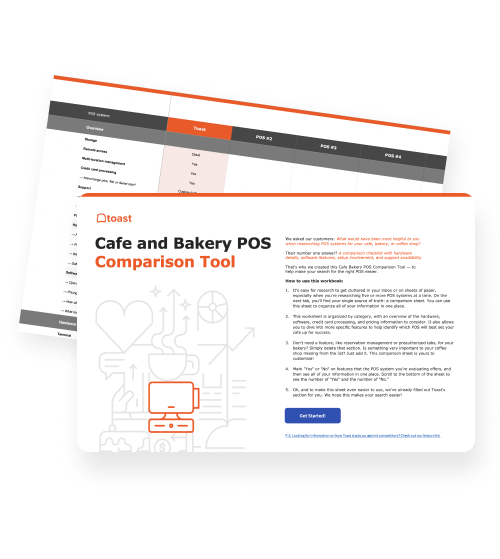
 RESOURCE
 Cafe and Bakery POS Comparison Tool
A free, customizable Cafe and Bakery POS Comparison Tool to research and compare point of sale systems in one Excel spreadsheet or editable PDF.
免费下载What is the best POS system for cafes?
Toast offers a POS purpose-built for restaurants and cafes, offers a $0 hardware Starter Kit on its Pay as You Go plan, and combines online ordering, loyalty, and employee management in one platform — making it especially well-suited for independent and multi-location cafes that need an all-in-one solution.
The best cafe POS system is the one that disappears into your operations. Your baristas shouldn't have to think about it, and your manager shouldn't have to fight it. And, while we’re at it, you shouldn't have to call support every time a menu item changes.
But with dozens of options on the market, each promising to be the easiest, fastest, and most affordable, choosing the right one is harder than it should be. This guide cuts through the noise. We'll cover the four most popular cafe POS systems, compare them head-to-head, and walk through the seven things your system absolutely needs to handle before you sign anything.
Coffee Shop Standard Operating Procedures Template
Use this free Standard Operating Procedures (SOPs) Template to easily create and outline standard operating procedures, create operational consistency, and easily train employees.

What is the most popular POS system for cafes?
According to Owner.com, the most popular POS systems for cafes include Toast, Square, POS Cafe, and a few others. Toast consistently ranks as a G2 Leader in restaurant POS. But popularity alone shouldn't drive your decision — fit should.
The most important question to ask when evaluating any system: was it built for restaurants and cafes, or adapted from a retail product? Generic retail POS systems can process payments, but they often lack kitchen display integration, menu modifier management, and timed pricing. Those gaps create friction when you can least afford it – like at 8 a.m. with a line out the door.
You'll also want to decide between a cloud-based POS and a legacy system. Cloud-based platforms like Toast offer easier updates, cleaner customer data, and support for online ordering. Legacy systems like NCR and Oracle Micros tend to be less adaptable as your needs evolve.
Cafe POS system comparison
System | Pricing | Best For | Standout Feature |
$0 hardware on Pay as You Go; paid plans from ~$69/month | Independent and multi-location cafes | Restaurant-first platform with built-in KDS, loyalty, online ordering, and Toast IQ AI assistant | |
Free base plan; paid plans from ~$60/month; hardware from ~$49 | Small cafes with simple menus | Easy setup | |
Plans from ~$69/month | Cafes focused on top-line reporting | Analytics — note Lightspeed is exiting the U.S. restaurant market | |
Hardware from ~$599; software from ~$14.95/month | Cafes wanting flexible hardware options | Versatile hardware ecosystem |
The 7 features every cafe POS system needs
1. A reliable, cloud-based POS terminal
This is the foundation of your front of house. A cloud-based terminal connects your handhelds, kitchen display, payroll, and other tools into one unified system. This is how you can manage both in-person and online orders while reducing ticket times. When it goes down, everything goes down, so reliability isn't negotiable.
2. Guest-facing screen
A guest-facing display lets customers see their order in real time, confirm accuracy, and sign digitally before payment. It can help reduce errors, speed up checkout, and give guests the transparency they've come to expect from modern hospitality.
3. Integrated kitchen display system (KDS)
A KDS replaces paper tickets with a digital screen that fires orders automatically based on prep time. During a morning rush, this keeps your team organized and eliminates the chaos of a printer pile-up. It also cuts down on paper waste.
For example, Toast customer and restaurant general manager Maria Lopez noted, “KDS made our kitchen 100% paperless and much quieter during the rush.”
4. Easy menu management
Your menu changes constantly with seasonal specials, price updates, and sold-out items. Your POS should handle all of it on the fly without restarting the system. Look for Quick Edit Mode, size and group pricing, and time-based pricing rules.
Toast IQ takes this further by letting you act directly from its AI chat interface. Add a seasonal beverage to your POS and it automatically syncs across your website, online ordering, and every other channel — no separate logins, no manual updates.
Bakery Menu Templates
Use these bakery menu templates as a starting point for your menu design or to give your menu a refresh.
5. Employee management & payroll
Labor is your highest cost. A POS that integrates scheduling, payroll, and team communication — like Toast Payroll & Team Management and Sling by Toast — cuts admin time and reduces miscommunication between shifts.
6. Online ordering
Guests want to order ahead, reorder from their seat, and pick up without waiting in line. A POS with built-in online ordering meets them where they are and takes pressure off your staff during peak hours.
7. Loyalty program and gift cards
A digital loyalty program keeps regulars engaged with points, sign-up bonuses, and birthday perks. Integrated gift cards let guests check balances online, and built-in reporting gives you visibility into redemptions so you can run smarter promotions.
How Toast works for cafes
Toast's Starter Kit is designed for cafes with fewer than 10 employees. Available as a countertop or handheld kit, it gets your team up and running fast with tools built around hospitality.
The Pay as You Go plan includes $0 hardware (shipping and taxes apply) and no monthly software fee. You pay a flat processing rate on every transaction, meaning Toast only earns when you do.
But don’t just take our word for it. On third-party review platforms, Toast's reputation is consistent.
As Angelli M. puts it,
“I like the customizability and ease of use that Toast offers. Since I started using Toast about 8 months ago, I've been able to manage orders easily, extending them from in-person to advanced online ordering without having to worry about payment. The initial setup was super easy, even though we were inexperienced in cafe ownership, which made the whole process so much simpler.”
Schedule a demo with a Toast specialist to find the right package for your setup.
What else to consider before choosing a cafe POS
Durability. Cafes are high-spill, high-drop environments. Your hardware needs to hold up to daily punishment without becoming a liability. Toast Go® 3 has an IP rating, meaning it’s resistant to liquid and dust, and is drop-rated up to 5 feet. It also offers cellular connectivity for added range and Wi-Fi backup.
Payment flexibility. Your system should handle contactless, chip, swipe, mobile wallets, and online payments — plus offline processing when your internet goes out, like Toast’s built-in offline mode.
Ease of use. Your POS should speed up service, not slow your baristas down.
Inventory and cost control. Solid inventory management helps you catch waste and make smarter purchasing decisions before margin problems compound.
Third-party integrations. The best cafe POS systems connect directly with your favorite delivery platforms like DoorDash and Uber Eats without workarounds or additional hardware.
Frequently Asked Questions
How much does a cafe POS system cost? Entry-level options like Toast's Pay as You Go plan offer $0 hardware with processing fees only. Paid software plans range from roughly $14.95 to $69+ per month, plus hardware and payment processing.
What POS do most coffee shops use? Toast is the most widely used, followed by Square, which is popular with smaller cafes for its free base plan and simple setup.
Do I need a restaurant-specific POS, or will a retail POS work? A restaurant-specific POS is strongly recommended. Retail systems typically lack KDS integration, modifier management, and timed pricing — all of which matter in a cafe environment.
What is the easiest cafe POS to use? Toast and Square are consistently rated the easiest to learn, which matters for cafes with frequent new hires and fast-paced service.
Can a cafe POS handle online ordering? Yes. Most modern cloud-based platforms — including Toast, Square, and Lightspeed — offer built-in or integrated online ordering.
咖啡店经营计划模板
使用这份免费的咖啡店经营计划模板,您可以轻松创建一份出色的经营计划。该计划既可以梳理您的愿景,又能助力您的咖啡店起步、发展或筹集资金。


这篇文章有帮助吗?
免责声明:此信息仅作为一般性参考,发布并不构成认可。Toast 不保证本内容中包含的任何信息、文本、图形、链接或其他项目的准确性或完整性。Toast 不保证如果您遵循本文的任何建议,就能取得任何特定结果。您可能需要咨询专业人士,如律师、会计师或商业顾问,以获取针对您情况的具体建议。
 趋势
趋势